Skip to main content Skip to main content Windows Experience Devices Windows Developer Microsoft Edge Windows Insider Microsoft 365 Microsoft 365 Azure Copilot Windows Surface Xbox Deals Small Business Support Windows Apps Outlook OneDrive Microsoft Teams OneNote Microsoft Edge Moving from Skype to Teams Computers Shop Xbox Accessories VR & mixed reality Certified Refurbished Trade-in for cash Xbox Game Pass Ultimate PC Game Pass Xbox games PC games Microsoft AI Microsoft Security Dynamics 365 Microsoft 365 for business Microsoft Power Platform Windows 365 Small Business Digital Sovereignty Azure Microsoft Developer Microsoft Learn Support for AI marketplace apps Microsoft Tech Community Microsoft Marketplace Marketplace Rewards Visual Studio Microsoft Rewards Free downloads & security Education Gift cards Licensing Unlocked stories View Sitemap
October 21, 2014
Mobile

Microsoft Advertising releases enhancements to help promote your apps


Promoting your apps through ads is one of the most effective ways to drive discoverability and downloads. Since April, Windows Phone developers have been able to purchase ads to promote their apps directly through pubCenter; these ads appear in apps that use the Microsoft Ad SDK.

The Promote Your App feature in pubCenter has continued to evolve, and this month released several highly requested enhancements:

  • More platforms – promote Windows 8.x apps in addition to Windows Phone 7.x and 8.x apps
  • More markets – promote apps in more English-speaking markets
  • Increased budget – spend up to 5x more than previously: limit is now US$500/month per campaign
  • More graphic options – new templates
  • More agile – campaigns can now be paused and resumed
  • Easier to access – Windows Phone Dev Center dashboard includes a direct link

Promoting your apps through ads is an effective mechanism to drive awareness and downloads, and I recommend complementing this with other mechanisms such as featuring the Windows Store download badge prominently on your web site and in communications (Windows, Windows Phone), sharing your app to review sites and promoting the app via your web site and outbound communications.

We’ll also include the direct link to Promote your app in Promote your app:
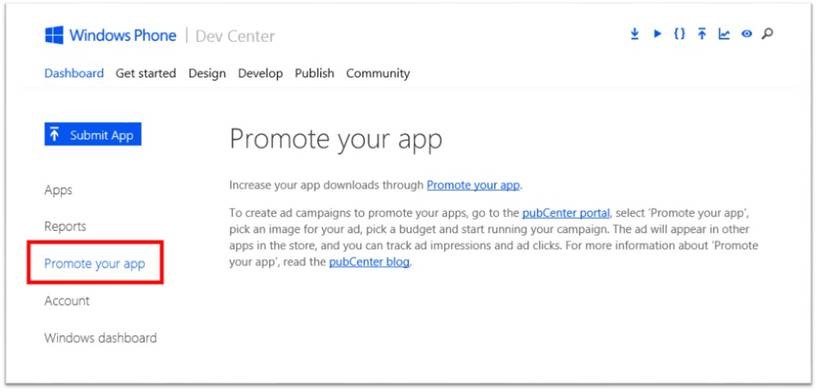
Promote your app

To promote Windows Phone apps, go to the Windows Phone Dev Center dashboard, and select Promote Your App.

To promote your Windows 8 app, go directly to pubCenter. In a month Windows Dev Center will include the direct link to Promote Your App.

Start promoting your app today, read the pubCenter blog for more details, and keep sending us feedback to help improve your ability to promote your apps.

Your Privacy Choices Opt-Out Icon Your Privacy Choices
Consumer Health Privacy Sitemap Contact Microsoft Privacy Manage cookies Terms of use Trademarks Safety & eco Recycling About our ads