Skip to main content Skip to main content Windows Experience Devices Windows Developer Microsoft Edge Windows Insider Microsoft 365 Microsoft 365 Azure Copilot Windows Surface Xbox Deals Small Business Support Windows Apps Outlook OneDrive Microsoft Teams OneNote Microsoft Edge Moving from Skype to Teams Computers Shop Xbox Accessories VR & mixed reality Certified Refurbished Trade-in for cash Xbox Game Pass Ultimate PC Game Pass Xbox games PC games Microsoft AI Microsoft Security Dynamics 365 Microsoft 365 for business Microsoft Power Platform Windows 365 Small Business Digital Sovereignty Azure Microsoft Developer Microsoft Learn Support for AI marketplace apps Microsoft Tech Community Microsoft Marketplace Software companies Visual Studio Microsoft Rewards Free downloads & security Education Gift cards Licensing Unlocked stories View Sitemap
May 11, 2016
Mobile

Publishing to Windows Store: Introducing the Windows Dev Center Tips series


Windows Dev Center offers many options to manage your app publishing process. These include ways to release beta versions as well as ways to target specific packages to different groups of users. Some of these options were just recently announced at Build 2016 a few weeks ago. In order to help you become more familiar with these choices, we’re starting a new blog series called Windows Dev Center Tips to walk you through several common publishing scenarios:

As you review this guidance, remember that the Windows Store enables you to submit apps with one or more packages. The selections you make regarding visibility, description, and price apply to all of your app’s packages, and each package in the app can target multiple OS versions and various devices.

At a high level, there are two ways to publish an app: either enable it to be acquired by any customer, or limit which customers can acquire it. Beyond this, the new package flighting feature gives you granular control to target specific app updates to specific customers. When considering different publishing options, think about what scenario you are looking to support, how much you want to limit access to the app, and if you want to enable any customer to acquire the app or limit customer acquisition.

The decision tree below outlines these options, which we will cover in more detail throughout this series:
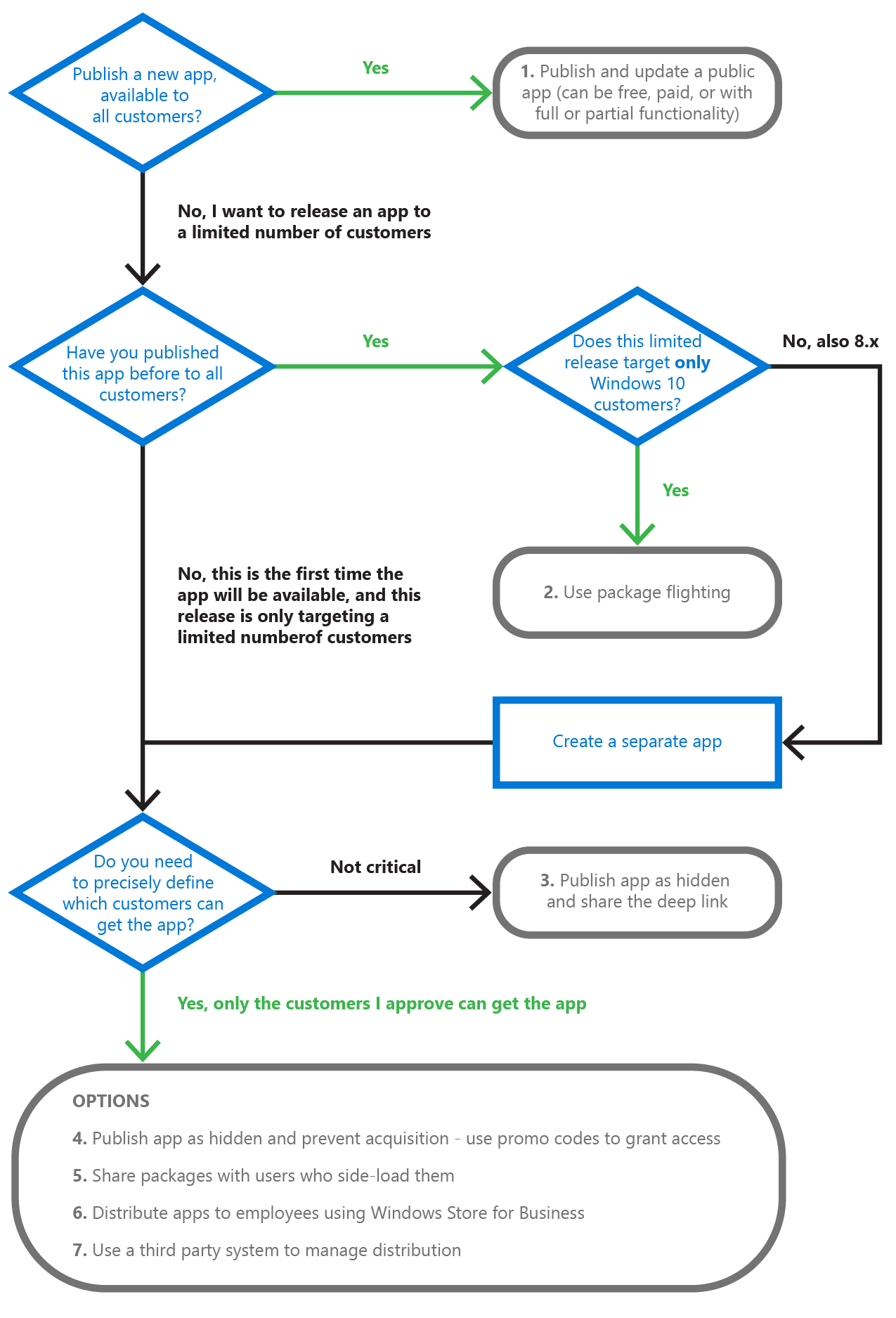
flowchart

Keep an eye out for the rest of the Windows Dev Center Tips series over the coming weeks as we look more closely at the pros and cons of each of the deployment options in this flowchart.

Your Privacy Choices Opt-Out Icon Your Privacy Choices
Consumer Health Privacy Sitemap Contact Microsoft Privacy Manage cookies Terms of use Trademarks Safety & eco Recycling About our ads