Skip to main content Skip to main content Windows Experience Devices Windows Developer Microsoft Edge Windows Insider Microsoft 365 Microsoft 365 Azure Copilot Windows Surface Xbox Deals Small Business Support Windows Apps Outlook OneDrive Microsoft Teams OneNote Microsoft Edge Moving from Skype to Teams Computers Shop Xbox Accessories VR & mixed reality Certified Refurbished Trade-in for cash Xbox Game Pass Ultimate PC Game Pass Xbox games PC games Microsoft AI Microsoft Security Dynamics 365 Microsoft 365 for business Microsoft Power Platform Windows 365 Small Business Digital Sovereignty Azure Microsoft Developer Microsoft Learn Support for AI marketplace apps Microsoft Tech Community Microsoft Marketplace Marketplace Rewards Visual Studio Microsoft Rewards Free downloads & security Education Gift cards Licensing Unlocked stories View Sitemap
September 17, 2015
Mobile

Initial preview of Silverlight bridge to UWP


Today marks the initial release of Mobilize.NET’s Silverlight bridge, which helps Windows Phone Silverlight app developers bring their WP Silverlight 8.x apps to the Windows 10 Universal Windows Platform (UWP). Announced at Build 2015, the Moblize.NET bridge is free and directly integrates into Visual Studio. The bridge currently maps the 700 most used APIs and handles transitioning your manifests, APIs, XAML, NuGet package references and async/await changes. More APIs and mappings will follow with future updates. Mobilize.NET has a much more in-depth post on the Silverlight bridge that goes into detail on the features, so here we share only a high-level overview of the tool.

Once you use the tool to bring your app to the UWP, your app will have all the power of a UWP app, including the ability to – from a single code base – run on a PC, phone, Xbox, HoloLens, or even a Raspberry Pi.

Running the bridge

Once installed, open up Visual Studio, load your WP Silverlight app, then right-click your project from the Solution Explorer and select the “Convert to UWP” option. Additionally, any project that is in the solution will be migrated.
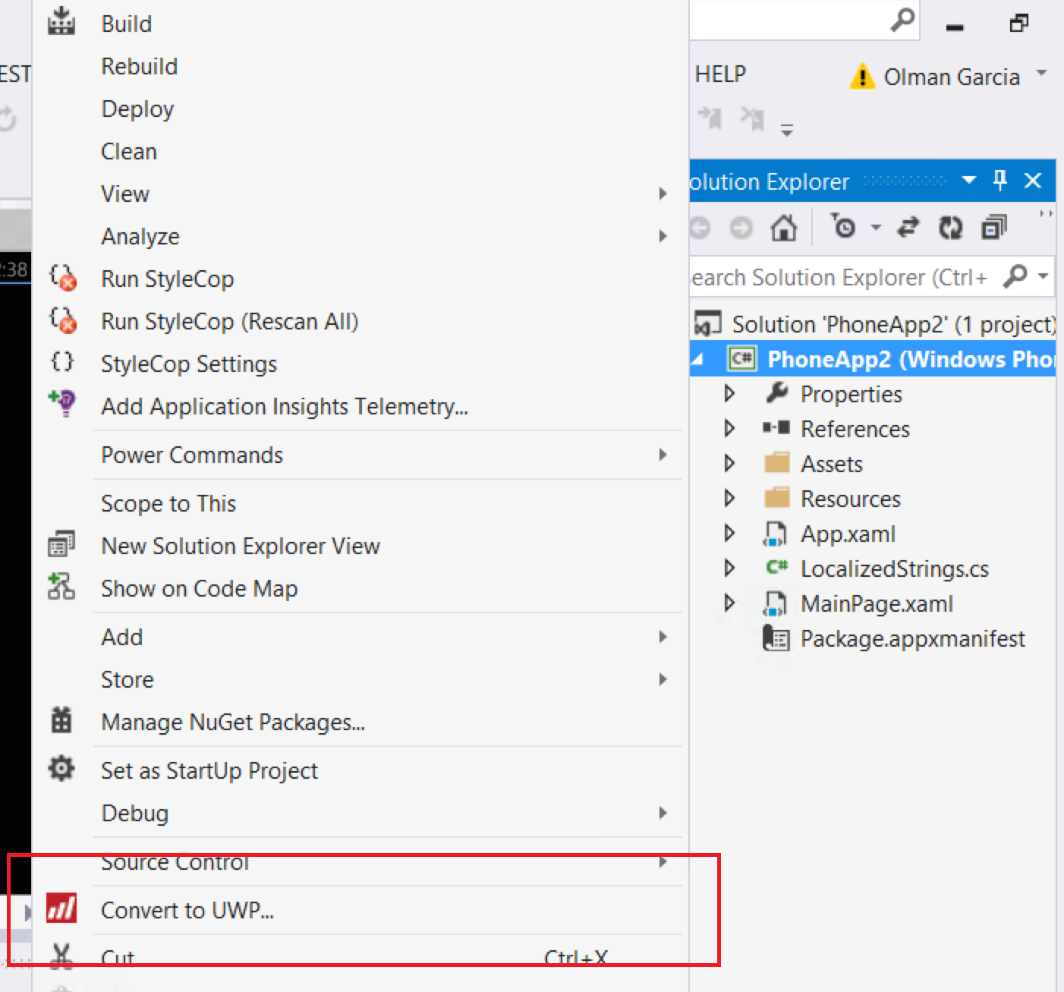
1_migrateSlToUwp

Helping extend and improve the mappings

The Silverlight bridge does the migration with a feature named the Mapping Mechanism. All mappings bundled with the tool have been open sourced and published in a public GitHub repository (https://github.com/MobilizeNet/UWPConversionMappings). This way developers around the world can use them as a reference implementation to write their own.

Start Migrating

The Silverlight bridge may not do a full transition as this is an initial preview now but the tool should get you most of the way. Since Silverlight is similar to UWP but not the same so most errors should be pretty straightforward to resolve. Once you fix compiler errors, you should be ready to start testing and adjusting your app.

The Building apps for Windows 10×10 article series has some helpful guidance on building apps. Topics range from building responsive UIs, speech, live tiles, to how to help get your app promoted in the Store.

Your Privacy Choices Opt-Out Icon Your Privacy Choices
Consumer Health Privacy Sitemap Contact Microsoft Privacy Manage cookies Terms of use Trademarks Safety & eco Recycling About our ads