


PORTLAND, OR, USA – We’ve been having an interesting internal debate here at the Conversations desk and we thought we’d share that dissension with you. The question up for debate is: what is the best way to input text on a mobile device? On Monday, Adam started the online discussion by talking about his (wrong :)) opinion about T9 and his preference for this input method, and yesterday James offered his thoughts on why physical keys on the Nokia E6 are the best input method, yet. Today, I lay the case for using virtual keyboards, specifically Swype.
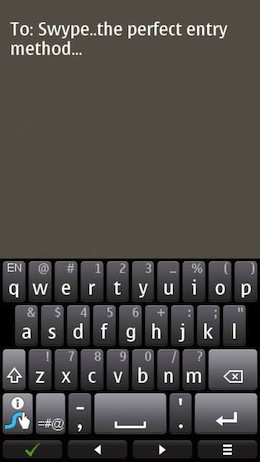
I’m taking the position that today’s phones are modern machines and it’s time to embrace current times and choose a QWERTY virtual keyboard. For me and my daily use, Swype is the king of text entry for a few very good reasons. Let’s dig in.
Yes T9 has been around forever and the method is a legacy from the good old days of having 9-key hardware keyboards, such as those found (at one end) of the ever popular Nokia N95. However, it’s time to move on. We’re in the age of the touchscreen and virtual QWERTY keyboard are the way of the future for a reason.
The Nokia N8, with its bright screen and enhanced usability with kinetic scrolling and capacitive touch capability, is the perfect solution for a great Swype experience. Also, with Symbian Anna here, we can have Swype in portrait or landscape mode.
By utilizing Swype, I can easily type out a message, whether an SMS or a full email message, tapping into the muscle memory I’ve developed from decades of touch typing on a traditional keyboard. As an avid keyboarder on a normal keyboard, I can extend these skills over to my virtual keyboard when I have access to Swype. Plus, Swype is free in the Ovi Store, so it’s an easy acquisition if you’re looking for a solid virtual keyboard solution.
In the sense of typing quickly and efficiently on a Swype keyboard, I’m not the only one. The world record holder in text messaging input broke the record by composing messages while utilizing Swype. This goes to show that Swype is not only easy to use, it’s efficient as well.
What are your thoughts – do you like Swype on your Nokia phone?