


PORTLAND, OR, United States – Americans are known for working too hard. And mobile phones blur the lines between work and play. With a cell phone in our pocket, we’re constantly ‘on’. Email someone at 9pm on a work day, wherever they are, and we expect a response within an hour or two. Whether you think this is good or bad, it’s a fact of life in the mobile world nowadays.
My mobile phone has become far more than a personal device for messaging, capturing photos and social networking. As my work and personal life blend together, my mobile device is at the center of this. For example, on my Nokia N8, I have work email and my personal email, as well as my personal and work calendars.
So which other apps and services best allow us to be connected and “in the loop” while we’re outside the physical confines of the office?
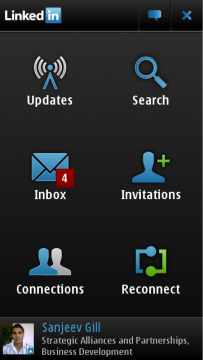
LinkedIn: This career-oriented website has been a boon for those seeking employment or for just staying connected to colleagues and co-workers, past and present. LinkedIn has made a huge investment in mobile in the last year, realizing that smartphone users are exactly the kind of customers they need.
Available on the Nokia N8, E7 and C7, LinkedIn for Nokia lets you fully interact with the LinkedIn website by utilizing six modules within the application. In Updates, you can view and share updates, whether it’s a status message or just a thought about your business. Connections shows your network and your contacts’ data. Consider this your address book in the cloud. Inbox displays messages and lets you compose messages if you want to send a private message.
Invitations allows you to approve (or disapprove if someone is on your bad list) requests and invitations. Lastly, Reconnect will supply suggestions for new connections based on places you’ve worked or based on your existing connections.
JoikuSpot: Working on the go is all about being online. But often, finding reliable Wi-Fi is extremely hard. This is where JoikuSpot comes in. This application turns your Nokia phone into a mobile hotspot, meaning you can use Wi-Fi on any compatible device (such as a laptop, eReader or MP3 Player) to use the 3G connection on your phone to conduct business. JoikuSpot costs $9.99. And as anyone will know who has been hit by poor Wi-Fi when a deadline is approaching, it’s well worth the investment.
cuteBox: Storing files and having access to them wherever we go is a huge advantage for a mobile workforce. cuteBox is a Qt application that gives mobile users access to Dropbox on their Nokia devices. The application is lighting fast and works flawlessly to bring Dropbox access to you and your mobile phone. cuteBox gives you the ability to view, delete and manage your files that exist in the cloud on Dropbox.
We would love to extend the conversation below. What applications let you work remotely or make it possible for you to stay in the loop while on the go?
Image credit: orcmid