

Take note: Papyrus on the Lumia 1320
Technology is a funny thing sometimes. We talk about how smartphones are revolutionising communications. And then it turns out that some of the best-loved apps do very, very simple things, like simulate a notepad and pen.
Meet Papyrus, which is just such an app, winning rave reviews on the Windows Phone Store, with an average rating of 4.5 stars out of 5 and reviews like this from ‘David’:
Excellent app. Love the new features including two types of erasers, ability to share notes, and backup to cloud. Infinite pages are great. Very powerful, yet intuitive design. Nice work.
Reed on for the details
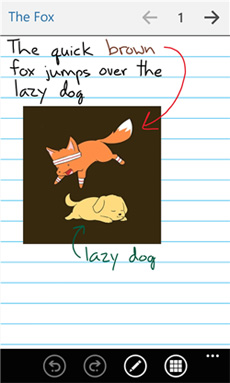
Of course, the app has more than a few tricks up its sleeve that give it some advantages over paper-based systems. For a start, your notes and doodles are backed up to the cloud. Second is the powerful vector graphics engine which means that (a) notes can be zoomed in and out quickly and easily; (b) performance is always very fast; and (c) your notes take hardly any space or time to load or upload.
Different colours and stroke weights allow you to add impact and variety to your notes. They also allow the app to double as a child’s toy, of course.
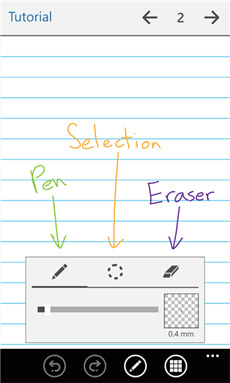
There’s a ton of flexibility when it comes to organising and sharing your notes, with output to PDF, JPG and PNG for easy-sharing. Undo and redo tools, together with selection and editing options mean that you get a lot of power for your (no) money.
Some of you might argue that all of this electro-wizardry still won’t beat the creative potential of a good, old-fashioned notebook. That may be true: I am sure it varies from person to person. But a bit like the arguments around phone cameras versus dedicated devices, the best notebook is the one that’s always with you. And any time the phone evolves to allow me to keep one more piece of equipment at home instead of in my bag, that’s a reason to celebrate.
A six-inch match for fat fingers
Of course, it somewhat depends on which phone you’re using. On smaller, svelter devices, you’re going to struggle, especially if you have fat fingers, like me. Where Papyrus really shines is with the new 6-inch devices, the Lumia 1320 and Lumia 1520.
The key to gaining mastery is being able to zoom in and out quickly – so you can write your notes at a comfortable size, but then zoom out so they’re a lot more compact when you’re reading back through your work. It’s not a knack that comes instantaneously, but it’s certainly worth the effort getting to grips with the technique.
Papyrus is a free download. Give it a scribble and let us know what you think.