

Exclusive: Video Tuner for Windows Phone
Now you can edit your videos right on your Windows Phone 8.1 smartphone.
[youtube]QG5dStYoqRY[/youtube]
Editing videos you’ve shot from your smartphone has typically required the need to get them off your device and onto a computer.
Then, you’d need either a) some expensive editing software b) to use some clunky freeware.
With the Video Tuner app, you can keep everything in one place, making the process much quicker, easier and, best of all, free.
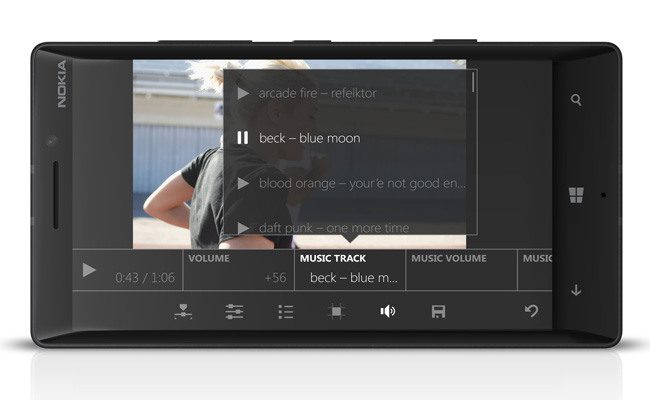
Once installed, you have instant access to a set of basic, yet powerful, tools, such as trim, crop, rotate, flip, mirror, and speed change.
Delve deeper and you’ll find more advanced features, such as adding music to your video and adjusting the volume to suit particular scenes.
Need to adjust the exposure, contrast, and saturation levels? Yep, you can do that, too.
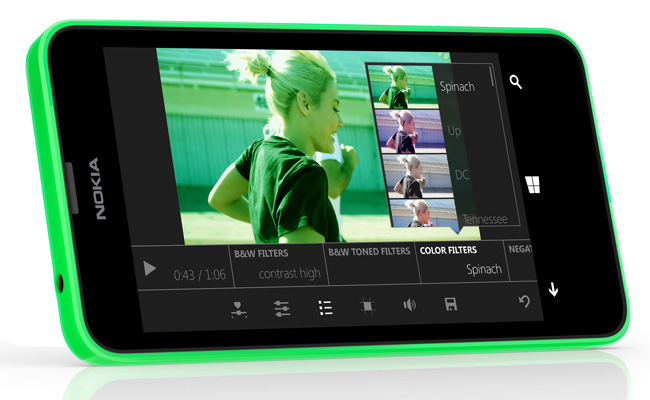
Thanks to the likes of Instagram, we’re all well-versed at using effects to change the look and feel of our images. The same applies with Video Tuner, just select your filter and away you go.
Video Tuner can also be used to trim any of the unwanted or unnecessary parts from your video, allowing you to share the only the best bits.
Once you’ve saved your video, you’ll find it in your phone ready to be shared with your friends and family.
Are you looking to improve your Lumia videos? Download Video Tuner today, for free.