

In recent releases, we’ve talked often about our goal to bring the team and technologies behind our web platform closer to the community of developers and other vendors who are also working to move the Web forward. This has been a driving motivation behind our emphasis on providing better developer tools, resources for cross-browser testing, and more ways than ever to interact with the “Project Spartan” team.
In the same spirit of openness, we’ve been making changes internally to allow other major Web entities to contribute to the growth of our platform, as well as to allow our team to give back to the Web. In the coming months we’ll be sharing some of these stories, beginning with today’s look at how Adobe’s Web Platform Team has helped us make key improvements for a more expressive Web experience in Windows 10.
Adobe is a major contributor to open source browser engines such as WebKit, Blink, and Gecko. In the past, it was challenging for them (or anyone external to Microsoft) to make contributions to the Internet Explorer code base. As a result, as Adobe improved the Web platform in other browsers, but couldn’t bring the same improvements to Microsoft’s platform. This changed a few months ago when Microsoft made it possible for the Adobe Web Platform Team to contribute to Project Spartan. The team contributes in the areas of layout, typography, graphic design and motion, with significant commits to the Web platform. Adobe engineers Rik Cabanier, Max Vujovic, Sylvain Galineau, and Ethan Malasky have provided contributions in partnership with engineers on the IE team.
Adobe contributions in the Windows 10 March Technical Preview
The Adobe Web Platform Team hit a significant milestone with their first contribution landing in the March update of the Windows 10 Technical Preview! The feature is support for CSS gradient midpoints (aka color hints) and is described in the upcoming CSS images spec. With this feature, a Web developer can specify an optional location between the color stops of a CSS gradient. The color will always be exactly between the color of the 2 stops at that point. Other colors along the gradient line are calculated using an exponential interpolation function as described by the CSS spec.
Syntax:
linear-gradient(90deg, black 0%, 75%, yellow 100%)
radial-gradient(circle, black 0%, 75%, yellow 100%)
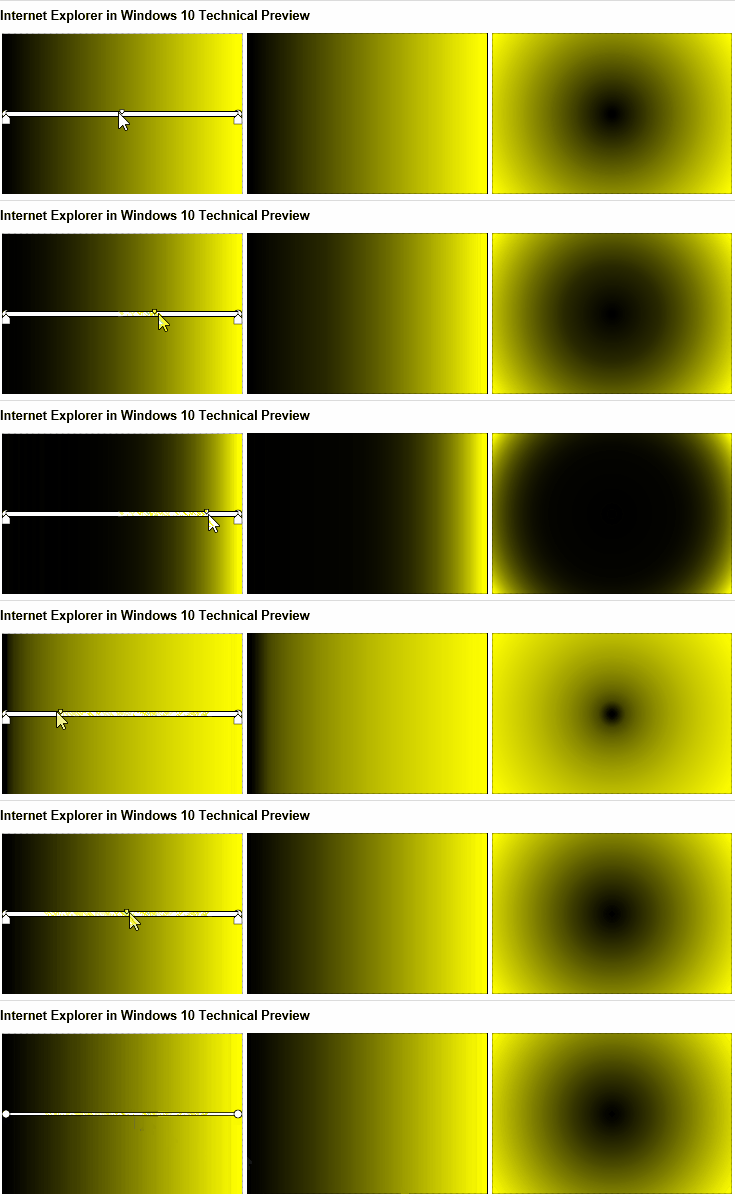
You can check this out yourself on this CSS Gradient Midpoints demo page. Just install the March update to Windows 10 Technical Preview and remember to enable Experimental Web Platform Features in about:flags to enable the new rendering engine. This change will bring IE to the same level as WebKit Nightly, Firefox beta and Chrome.
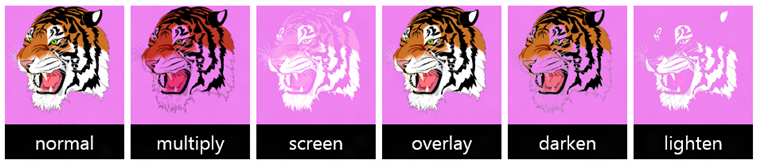
Another change that Adobe has recently committed is full support for <feBlend> blend modes. The W3C Filter Effects spec extended <feBlend> to support all blend modes per the CSS compositing and blending specification. Our new engine will now support these new values like the other major browsers.
New blend modes expand existing values normal, multiply, screen, overlay, darken and lighten with color-dodge, color-burn, hard-light, soft-light, difference, exclusion, hue, saturation, color and luminosity.
To use the new modes just specify the desired mode in the <feBlend> element. For example:
<feBlend mode=’luminosity’ in2=’SourceGraphic’ />
Internet Explorer 11
Project Spartan
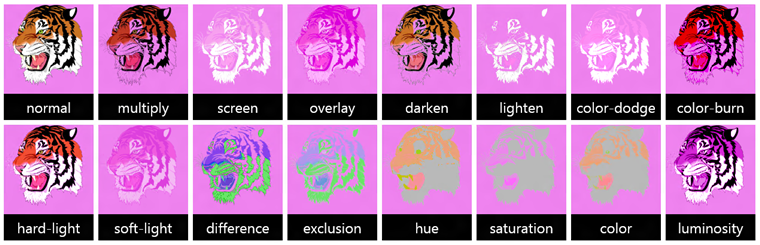
You can try this out today at Adobe’s CodePen demo in Internet Explorer on the Windows 10 Technical Preview by selecting “Enable Experimental Web Platform Features” under about:flags.
We are just getting started
Congratulations to the Adobe Web Platform Team on their first commit! We are looking forward to a more expressive Web and moving the Web platform forward! Let us know what you think via @IEDevChat or in the comments below.
— Bogdan Brinza, Program Manager, Project Spartan