

Paint update begins rolling out to Windows Insiders
UPDATE 3/20: The following update for Paint is now rolling out to Windows Insiders in the Beta and Release Preview Channels.
Hello Windows Insiders, today we are beginning to roll out an update for Paint (version 11.2502.121.0) to Windows Insiders in the Canary and Dev Channels on Windows 11.
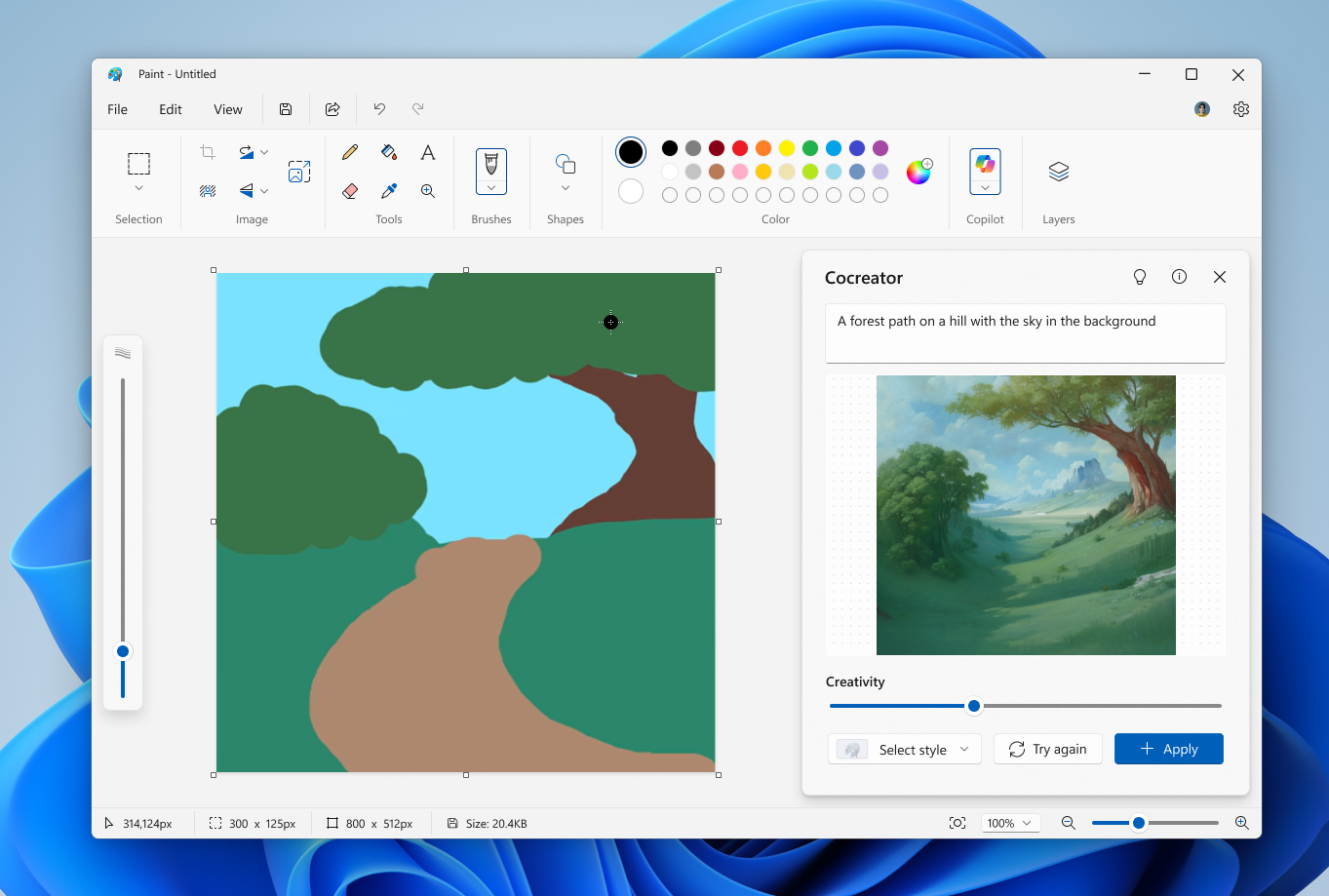
In this update, we are improving the Cocreator side panel user experience with a simplified and more intuitive layout. To get started, click on Cocreator in the Copilot menu and describe what you would like to create. Start drawing on the canvas with your mouse or pen to start generating the artwork with AI.
You can use the Creativity slider and the Select style dropdown as it is today. The newly introduced Try again button can be used to generate a new version of the image, and the Apply button can be used to apply the generated content to the Paint canvas once you are satisfied with the final result.
FEEDBACK: Please file feedback in Feedback Hub (WIN + F) under Apps > Paint.
As always, we love getting feedback from the community and we will be looking out for your thoughts and suggestions on these updates!
Thanks,
Dave Grochocki, Principal Group Product Manager – Windows Inbox Apps