

Announcing Windows 11 Insider Preview Build 28020.1611 (Canary Channel)
Hello Windows Insiders, today we are releasing Windows 11 Insider Preview Build 28020.1611 to the Canary Channel (the desktop watermark is showing the wrong build number and will be addressed in a near term build). (KB 5077221)
What’s new in Canary Build 28020.1611
Changes and Improvements gradually being rolled out with toggle on*
[Built-in Sysmon]
Previously announced here, Windows now brings Sysmon functionality natively to Windows. Sysmon functionality allows you to capture system events that can help with threat detection, and you can use custom configuration files to filter the events you want to monitor. The captured events are written on the Windows event log, enabling them to be used with security applications and a wide range of use cases.
Built-in Sysmon is disabled by default and must be explicitly enabled.
- Go to Settings > System > Optional features > More Windows features > checking Sysmon or in PowerShell or command prompt:
-
Dism /Online /Enable-Feature /FeatureName:Sysmon
-
- To complete the installation, from PowerShell or command prompt run:
-
sysmon -i
-
Note: If you’ve already installed Sysmon from the website, it must be uninstalled before enabling the built-in Sysmon.
Documentation will be added to Windows soon. The functionality of Sysmon remains unchanged, learn more https://learn.microsoft.com/sysinternals/downloads/sysmon.
[Windows Share]
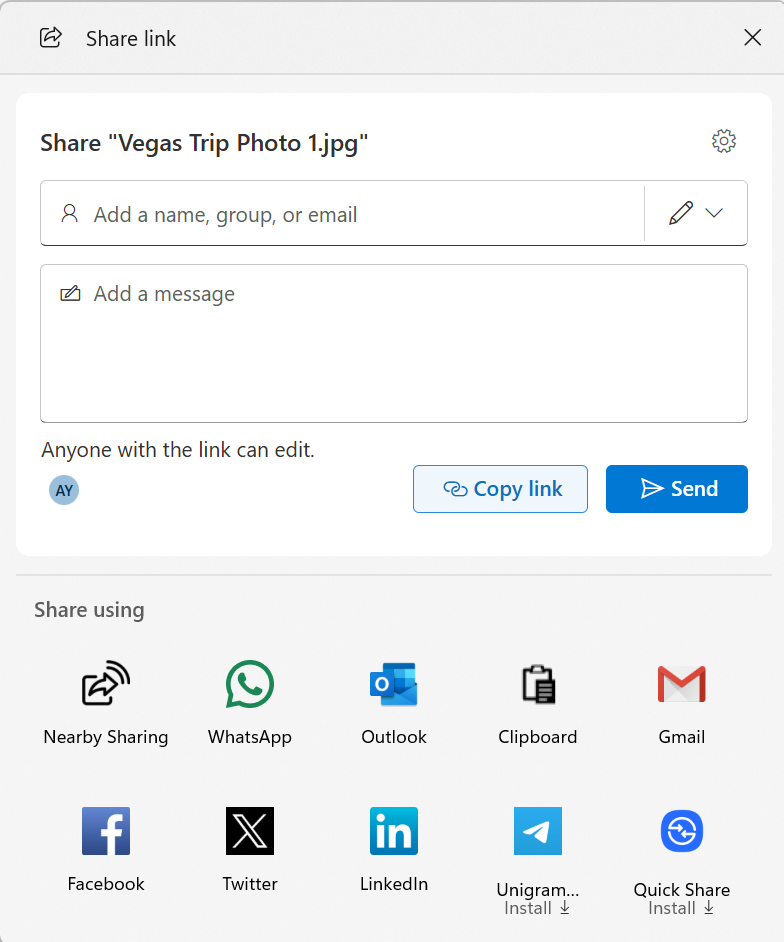
- When you share a OneDrive cloud file by right-clicking to share on the file – new options for sharing that link through other apps will be provided under “Share using” when the “Copy link” button is clicked. This experience is rolling out to Windows Insiders signed in with their Microsoft accounts not in the EEA.
[General]
- Fixed the desktop watermark to show the correct build number.
Reminders for Windows Insiders in the Canary Channel
- These builds can be unstable and may be released with limited documentation. Join Windows Insider – Get early access to Windows 11 features & updates
- The builds we release to the Canary Channel represent the latest platform changes early in the development cycle. Features and experiences included in these builds may never get released as we try out different concepts and get feedback. Features may change over time, be removed, or replaced and never get released beyond Windows Insiders. Some of these features and experiences could show up in future Windows releases when they’re ready.
- Many features in the Canary Channel are rolled out using Control Feature Rollout technology, starting with a subset of Insiders and ramping up over time as we monitor feedback to see how they land before pushing them out to everyone in this channel.
- The desktop watermark shown at the lower right corner of the desktop is normal for Windows Insider pre-release builds.
- Some features may show up in the Dev and Beta Channels first before showing up in the Canary Channel.
- Some features in active development we preview with Windows Insiders may not be fully localized and localization will happen over time as features are finalized. As you see issues with localization in your language, please report those issues to us via Feedback Hub.
- To get off the Canary Channel, a clean install of Windows 11 will be required. As a reminder – Insiders can’t switch to a channel that is receiving builds with lower build numbers without doing a clean installation of Windows 11 due to technical setup requirements.
- Check out Flight Hub for a complete look at what build is in which Insider channel.
Thanks,
Windows Insider Program Team
*Functionality will vary by device and market; text actions will be available across markets in select character sets. See aka.ms/copilotpluspcs.