

Copilot App on Windows: Opening web links alongside your conversations begins rolling out to Windows Insiders
Hello Windows Insiders,
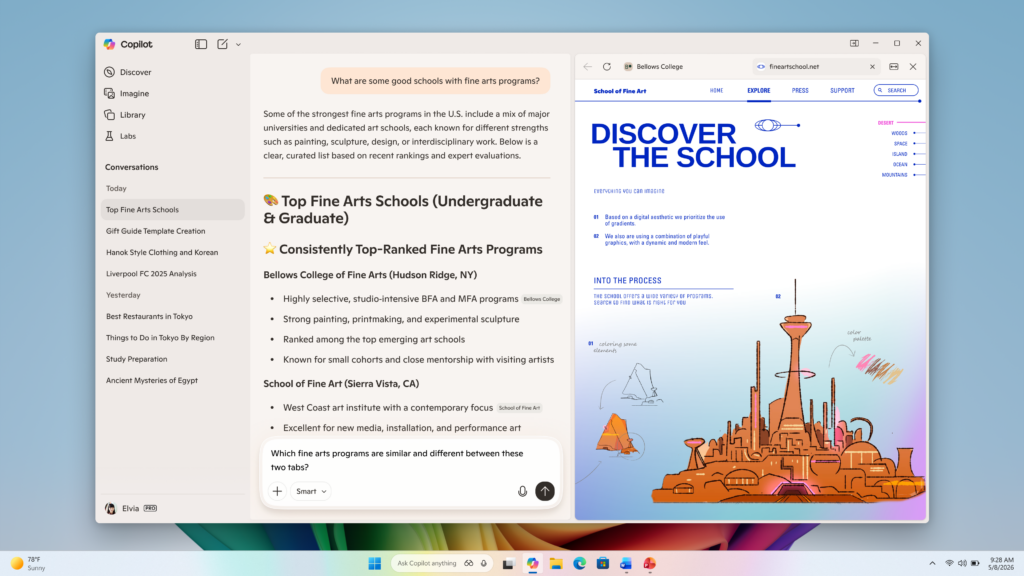
In today’s update, we are introducing a new way to get things done in the Copilot App on Windows. Now, when you click to open a link, Copilot opens the content in a sidepane next to your conversation instead of a separate browser window, so you don’t lose context.
With your permission, Copilot will also have access to the context of the tabs you open in that conversation (and only in that conversation), so you can ask clarifying questions, summarize information across tabs, or ask Copilot’s help in drafting exactly the right words needed for the task. Tabs you open will be saved with the conversation, so you can return to them when you come back to that conversation. Additionally, if you choose to enable it, you can sync passwords and form data so it’s easier to work within Copilot.
Today’s release also comes with an update to the Copilot App that makes it faster, more reliable, and packed with all of the latest Copilot features that make the PC experience even better. As part of this update, some features like Podcasts and Study and Learn mode from Copilot.com are getting added, while others may be pulled back while we iterate on the experience; we will add priority features back in before the updated app is generally available.
These updates (Copilot app version 146.0.3856.39 and higher) are beginning to roll out to all Insider Channels. Availability may vary as we gradually expand the rollout to Insiders worldwide. We’re excited to preview these improvements with our Insider community and ensure we deliver a great Copilot experience for all Windows customers. With the power of the web, you’ll be able to get even more things done with Copilot.
FEEDBACK: Please provide feedback directly within the Copilot app by clicking on your profile icon and choosing “Give feedback”.
Thanks,
Microsoft Copilot Team