

Announcing new builds for 1 May 2026 and extending ISO support
Hello Windows Insiders,
Today we are expanding the rollout of the new Windows Insider experience improvements to Canary Channel 28000 series devices, which will begin to move to Experimental (26H1). As a reminder, this does not change your current version of Windows, just bringing you the latest improvements to the Windows Insider experience.
Extending ISO download support
One of the areas of feedback we received was that many of you like to use ISOs to install your builds. We’ve heard you, and are committing to releasing ISOs available to download alongside regularly scheduled builds across all versions of the Beta and Experimental channels.
To find ISOs for Windows Insider Preview Builds, see the Windows Insider Preview Downloads page.
[Update 5/6/2026: Thank you for the great feedback regarding ISO availability. For clarity, we aim to release ISOs the week following their build flighting]
New builds this week
Today we are releasing new Windows 11 Insider Preview Builds. As a reminder, all Insiders can find the release notes for your device based on the new channel system, even if you haven’t moved yet. This is to make finding build information as easy as possible during the transition. See your channel release notes here:
- Beta (Including Beta Channel): Build 26220.8340
- Experimental (Including Dev Channel): Build 26300.8346
For those on other specific build versions, here are today’s new builds and release notes:
- Experimental (26H1) – Including Canary 28000 series: Build 28020.1921
- Experimental (Future Platforms) – Including Canary 29500 series: Build 29580.1000
As a reminder, you can always find your build number in the watermark on bottom right-hand corner of your desktop.
Notable new features:
[Run dialog update]
Release channel: Experimental
We’re rolling out a refreshed Run dialog experience designed to bring a more modern look and improved usability. This update introduces updated visuals and a cleaner interface, along with new controls that make it easier to manage the experience from within Settings. The refreshed Run dialog is currently available as an opt-in experience for Windows Insiders on the Experimental channel, where you can enable it by going to Settings > System > Advanced and turning on the new Run dialog option.
See the Dev blog announcement for more information.
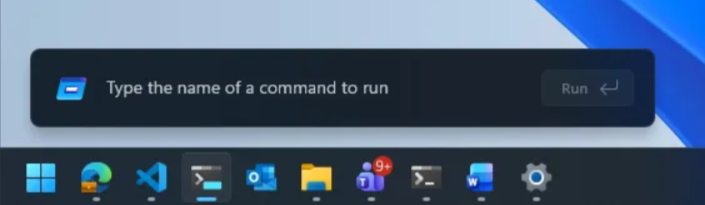
New run dialog
[Feedback Hub app update]
Release channel: Experimental, Experimental (26H1), Experimental (Future Platforms)
Thanks Windows Insiders that have been sharing feedback about the Feedback Hub – we’re now rolling out version 2.2604.301.0. This update contains a number of improvements based on what you’ve been telling us, including:
- Generally improved reliability.
- More tweaks to improve general design fit and finish, accessibility, and localization.
- The Community feedback section for non-English now allows you to switch view to English if you’d prefer.
- Collection titles and Official responses now will be automatically translated in top languages.
- The file upload limit when submitting feedback is back up to 500mb.
- Improved upvote and comment count accuracy for feedback.
Please keep the feedback coming! If you want to share any thoughts, you can file them in the Feedback Hub under Apps > Feedback Hub.
[Widgets is quiet by default]
Release channel: Experimental
We’re working to make Widgets feel less distracting and overwhelming by making the experience quiet by default.
To do this, we’re testing a new set of default settings designed to reduce unexpected alerts and visual interruptions. These changes include:
- Disabling Open on hover by default
- Turning off taskbar badging by default
- Opening to widgets experience on first launch
- Limiting taskbar alerts until you choose to open and engage with the Widgets experience
If you prefer more proactive updates, you can easily turn features like taskbar badging back on through Widgets settings.
Thanks,
Stephen and the Windows Insider Program team