Skip to main content Skip to main content Windows Experience Devices Windows Developer Microsoft Edge Windows Insider Microsoft 365 Microsoft 365 Azure Copilot Windows Surface XBOX Deals Small Business Support Windows Apps Outlook OneDrive Microsoft Teams OneNote Microsoft Edge Moving from Skype to Teams Computers Shop Xbox Accessories VR & mixed reality Certified Refurbished Trade-in for cash Xbox Game Pass Ultimate PC Game Pass Xbox games PC games Microsoft AI Microsoft Security Dynamics 365 Microsoft 365 for business Microsoft Power Platform Windows 365 Small Business Digital Sovereignty Azure Microsoft Developer Microsoft Learn Support for AI marketplace apps Microsoft Tech Community Microsoft Marketplace Software companies Visual Studio Microsoft Rewards Free downloads & security Education Gift cards Licensing Unlocked stories View Sitemap
November 23, 2008
PC

The New Windows Taskbar in Windows 7


In Windows 7, we’re introducing a brand new Windows Taskbar. I touched upon this briefly in my notes from the PDC Keynote a few weeks ago. However last Thursday, the Windows Engineering Team over on the Engineering Windows 7 Blog published a much more in-depth look at the new Windows Taskbar in Windows 7. They take a close look several new features within the new Taskbar including Jump Lists, Pinning, Interactive Grouped Thumbnails, Aero Peek, and Color Hot Track. The overall goal behind the new Windows Taskbar is to allow people to be able to manage their application windows much easier as well as give them quick access to the information they need.
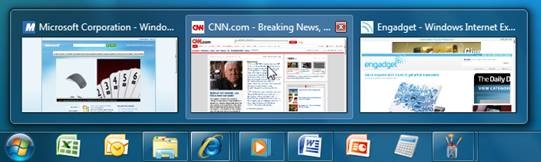
 

If you are interested in getting a “sneak-peek” at what’s coming for UI changes in Windows 7 specific to the Taskbar – definitely give this post a read. 

Your Privacy Choices Opt-Out Icon Your Privacy Choices
Consumer Health Privacy Sitemap Contact Microsoft Privacy Manage cookies Terms of use Trademarks Safety & eco Recycling About our ads