Skip to main content Skip to main content Windows Experience Devices Windows Developer Microsoft Edge Windows Insider Microsoft 365 Microsoft 365 Azure Copilot Windows Surface XBOX Deals Small Business Support Windows Apps Outlook OneDrive Microsoft Teams OneNote Microsoft Edge Moving from Skype to Teams Computers Shop XBOX Accessories VR & mixed reality Certified Refurbished Trade-in for cash XBOX Game Pass Ultimate PC Game Pass XBOX games PC games Microsoft AI Microsoft Security Dynamics 365 Microsoft 365 for business Microsoft Power Platform Windows 365 Small Business Digital Sovereignty Azure Microsoft Developer Microsoft Learn Support for AI marketplace apps Microsoft Tech Community Microsoft Marketplace Software companies Visual Studio Microsoft Rewards Free downloads & security Education Gift cards Licensing Unlocked stories View Sitemap
February 5, 2013
Mobile

Eyes wide open: New Microsoft Research photo app helps prevent missed shots


Blink app icon

Capturing great action shots—or just about anything involving kids—is tricky on any camera. Savvy photographers toting fancy-pants DSLRs typically boost their odds of success using burst mode, which automatically snaps multiple photos faster than any human could press the shutter button.

Now Microsoft Research has brought this capability to Windows Phone 8 in a free (and cutely named) app called BLINK, which just arrived in the Windows Phone Store. Download it now

The app—exclusively for Windows Phone 8— starts capturing a flurry of images before you even press the shutter button, and continues for a few moments after, so it no longer matter whether your finger is a touch early or late. Then just drag the small yellow box across the image-stabilized photos and choose the best of the bunch. BLINK is fast, easy to use, and gives you more control over your on-the-go picture taking, so you no longer have to curse your bad timing or grandpa’s unreliable lids. And if you’re curious about the app’s backstory, Rob Knies fills in some of the details on the Inside Microsoft Research blog.
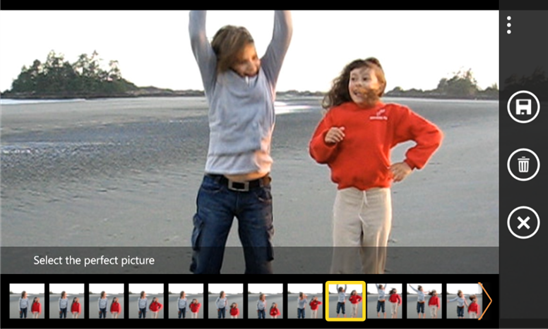
BLINK for WIndows Phone 8

Your Privacy Choices Opt-Out Icon Your Privacy Choices
Consumer Health Privacy Sitemap Contact Microsoft Privacy Manage cookies Terms of use Trademarks Safety & eco Recycling About our ads