Skip to main content Skip to main content Windows Experience Devices Windows Developer Microsoft Edge Windows Insider Microsoft 365 Microsoft 365 Azure Copilot Windows Surface XBOX Deals Small Business Support Windows Apps Outlook OneDrive Microsoft Teams OneNote Microsoft Edge Moving from Skype to Teams Computers Shop XBOX Accessories VR & mixed reality Certified Refurbished Trade-in for cash XBOX Game Pass Ultimate PC Game Pass XBOX games PC games Microsoft AI Microsoft Security Dynamics 365 Microsoft 365 for business Microsoft Power Platform Windows 365 Small Business Digital Sovereignty Azure Microsoft Developer Microsoft Learn Support for AI marketplace apps Microsoft Tech Community Microsoft Marketplace Software companies Visual Studio Microsoft Rewards Free downloads & security Education Gift cards Licensing Unlocked stories View Sitemap
April 30, 2014
PC

Bing Smart Search gets smarter in Windows 8.1


Bing Smart Search was first introduced as part of Windows 8.1 this last fall allowing you to swipe or type from your Start screen to find what you need like documents on your PC, a photo album in the cloud, your favorite app, or a website. Today, Bing has announced they are making improvements to Smart Search in Windows 8.1.
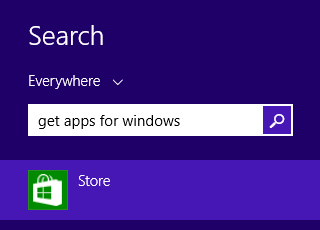
get-apps-for-windows-320x230_57F45B80

Improvements include making search more natural. For example, if you are unclear on where to go to find new apps for Windows, you can search “get apps for windows” where Smart Search will showcase the Windows Store. Bing has taken some of the most common tasks people perform in Windows 8.1 to have Smart Search show results based on natural language understanding.

Bing has also done some work to improve common spelling mistakes in the Smart Search bar and to showcase more apps that might be relevant to your search.

For more, see their blog post here.

Your Privacy Choices Opt-Out Icon Your Privacy Choices
Consumer Health Privacy Sitemap Contact Microsoft Privacy Manage cookies Terms of use Trademarks Safety & eco Recycling About our ads