Skip to main content Skip to main content Windows Experience Devices Windows Developer Microsoft Edge Windows Insider Microsoft 365 Microsoft 365 Azure Copilot Windows Surface XBOX Deals Small Business Support Windows Apps Outlook OneDrive Microsoft Teams OneNote Microsoft Edge Moving from Skype to Teams Computers Shop XBOX Accessories VR & mixed reality Certified Refurbished Trade-in for cash XBOX Game Pass Ultimate PC Game Pass XBOX games PC games Microsoft AI Microsoft Security Dynamics 365 Microsoft 365 for business Microsoft Power Platform Windows 365 Small Business Digital Sovereignty Azure Microsoft Developer Microsoft Learn Support for AI marketplace apps Microsoft Tech Community Microsoft Marketplace Software companies Visual Studio Microsoft Rewards Free downloads & security Education Gift cards Licensing Unlocked stories View Sitemap
July 29, 2014
Mobile

Cortana now shows local recommendations from Foursquare


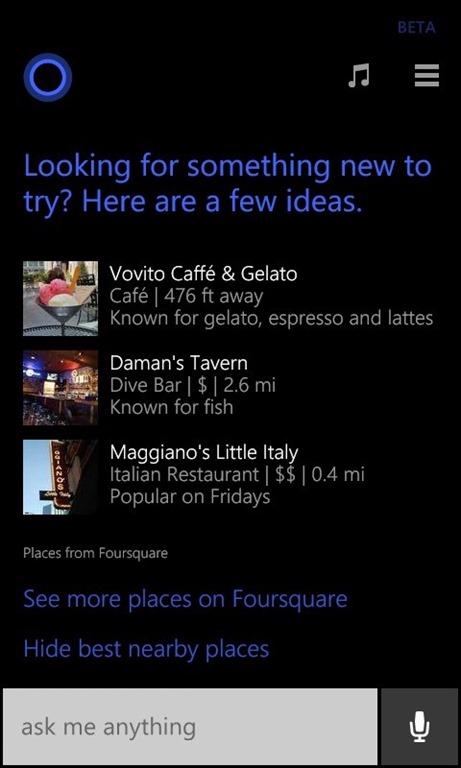
One of the benefits of Cortana is that we can make updates behind-the-scenes on the servers that light up new capabilities without the need for a software update. We added the ability for Cortana to predict the winners in popular soccer matches in Brazil courtesy of Bing magic earlier this month. Starting today, Cortana will now proactively showcase local recommendations from Foursquare on devices running Windows Phone 8.1 in the U.S. To turn this on, go to Cortana’s Notebook and then Interests and look for “best nearby” and then toggle this option to “ON”.
blog-foursquarelogo
2

How this works is that Cortana talks to the Foursquare service in the cloud and gets the best recommendations for your location and time of day. If a particular interest catches your eye, you can click on it and Cortana will open up that location in the Foursquare app. W00t! If you don’t have the Foursquare app installed (you can install it here!) then it’ll take you to the Foursquare web experience.

This is another example of Bing magic at play. For more, read this blog post from the Bing Blog.

Your Privacy Choices Opt-Out Icon Your Privacy Choices
Consumer Health Privacy Sitemap Contact Microsoft Privacy Manage cookies Terms of use Trademarks Safety & eco Recycling About our ads