Skip to main content Skip to main content Windows Experience Devices Windows Developer Microsoft Edge Windows Insider Microsoft 365 Microsoft 365 Azure Copilot Windows Surface Xbox Deals Small Business Support Windows Apps Outlook OneDrive Microsoft Teams OneNote Microsoft Edge Moving from Skype to Teams Computers Shop Xbox Accessories VR & mixed reality Certified Refurbished Trade-in for cash Xbox Game Pass Ultimate PC Game Pass Xbox games PC games Microsoft AI Microsoft Security Dynamics 365 Microsoft 365 for business Microsoft Power Platform Windows 365 Small Business Digital Sovereignty Azure Microsoft Developer Microsoft Learn Support for AI marketplace apps Microsoft Tech Community Microsoft Marketplace Marketplace Rewards Visual Studio Microsoft Rewards Free downloads & security Education Gift cards Licensing Unlocked stories View Sitemap
October 13, 2014
PC

Share from File Explorer in the Windows 10 Technical Preview


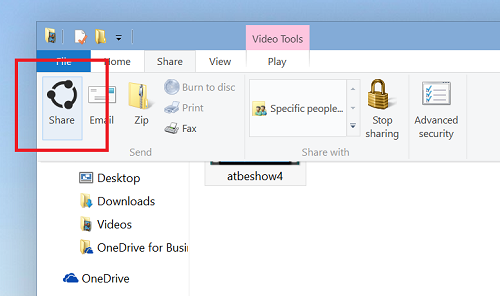
In the Windows 10 Technical Preview, we’ve added a new “Share” button in File Explorer to make it easy to share one or more selected files. Most file management happens through File Explorer, and now sharing is streamlined right where you need it.

share


Installed apps that enable sharing will work with this button; it will open the share experience just like in Windows 8.1 when the Share charm is used. For example – you can select a few photos directly in File Explorer, press the share button, and share directly to Facebook or Twitter if you have these apps installed. This implementation is of course in the very early stages with more work to be done in the coming months! If you have developed a Windows app, you can learn how to utilize the share contract in your app and benefit from this platform capability by clicking here.

Have feedback on this for us? Make sure you are signed up for the Windows Insider Program and use the Windows Feedback app to send feedback directly to us.

(I originally planned to publish this post this week but Brad Sams beat me to it – figure I would go ahead and post anyway.)

Your Privacy Choices Opt-Out Icon Your Privacy Choices
Consumer Health Privacy Sitemap Contact Microsoft Privacy Manage cookies Terms of use Trademarks Safety & eco Recycling About our ads