

As many of you know from reading my blog posts over the years or following me on Twitter, I’m a nerd. And this is going to make me even nerdier: I love maps. Growing up I was always looking at maps or drawing my own maps obsessing over detail and scale. That’s why I’m excited about today’s announcement from the Bing Team: the Bing Maps Preview is now available for Windows 8.1 from the Windows Store.
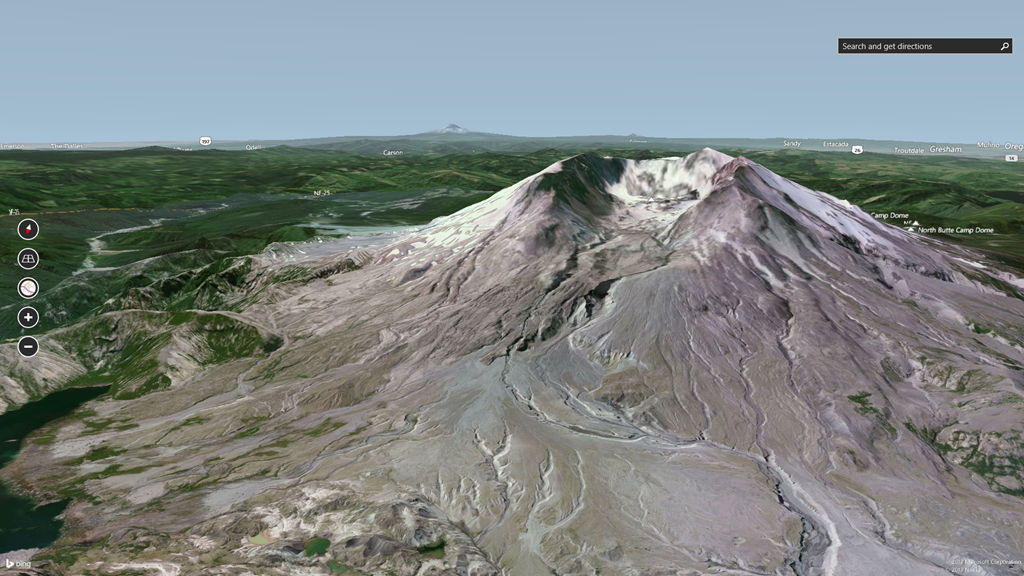
A first step in a new way to explore the world and made for touch, Bing Maps Preview was built from the ground up for Windows 8.1 to provide a seamless, dynamic way to experience mapping. With the Bing Maps Preview, you can also immerse yourself in maps through intuitive navigation controls which allow you to rotate left-to-right and up-and-down and see impressive 3D rendering of landscapes thanks to Bing’s advanced geometry engine. Orient yourself north if you need to or return to a straight-down view by tapping the orientation and tilt controls on the left of your screen. The Bing Maps Preview also has Streetside view, in-app searching, and several smart features such as traffic notifications on favorite routes, Local Scout and personalized Picks for You.

To start, we’re showcasing a focused list of over 70 cities from the around the world so you can get a glimpse of what’s to come. I can’t tell you how much fun I am having flying through different places around the world and seeing a 3D representation of how the landscape looks.
For more information on the Bing Maps Preview, click here to read Bing’s blog post.
Download Bing Maps Preview from the Windows Store and let me know what you think in comments!