Skip to main content Skip to main content Windows Experience Devices Windows Developer Microsoft Edge Windows Insider Microsoft 365 Microsoft 365 Azure Copilot Windows Surface Xbox Deals Small Business Support Windows Apps Outlook OneDrive Microsoft Teams OneNote Microsoft Edge Moving from Skype to Teams Computers Shop Xbox Accessories VR & mixed reality Certified Refurbished Trade-in for cash Xbox Game Pass Ultimate PC Game Pass Xbox games PC games Microsoft AI Microsoft Security Dynamics 365 Microsoft 365 for business Microsoft Power Platform Windows 365 Small Business Digital Sovereignty Azure Microsoft Developer Microsoft Learn Support for AI marketplace apps Microsoft Tech Community Microsoft Marketplace Software companies Visual Studio Microsoft Rewards Free downloads & security Education Gift cards Licensing Unlocked stories View Sitemap
October 5, 2010
PC

Loilo Touch


Loilo Touch is a new video-editing application from Loilo that leverages Windows Touch. Loilo has also gone the extra mile to earn the Compatible with Windows 7 logo. I actually hadn’t considered using touch to edit videos before, but I have to admit it’s pretty fun.
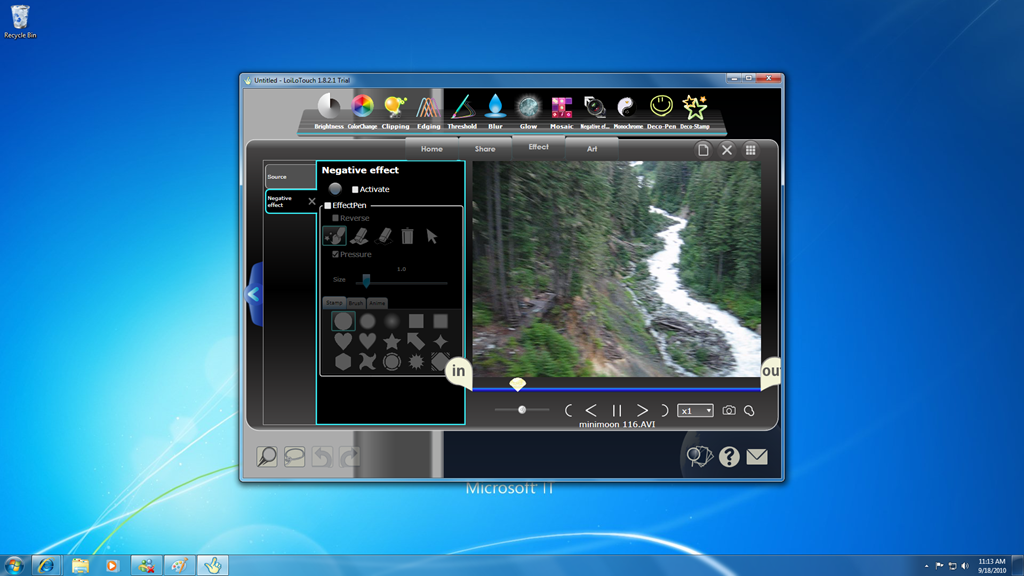
loilo touch1

Loilo has tons of effects. You can adjust the brightness, change color, clip, blur, glow, or add a mosaic. For those, who want to get more creative you can even experiment with a negative effect to replicate the look of a film negative. My favorite feature is Deco-Pen, which lets you jot down a note in the video. When you play the video it actually shows your note being written just as you wrote it.

loilo touch2

Loilo Touch offers a free trial, so that is a great way to try it and decide for yourself.

Tags:
software
Your Privacy Choices Opt-Out Icon Your Privacy Choices
Consumer Health Privacy Sitemap Contact Microsoft Privacy Manage cookies Terms of use Trademarks Safety & eco Recycling About our ads