

As you build new apps or improve existing apps, it’s important to understand as much as possible about the store where your apps will be offered. We frequently get questions about the best categories, the best markets, top languages, and so on.
We started sharing information in the Explore Store Trends section of the Windows Store Dashboard, including some user demographics and catalog information. Very few developers used these reports, and we received feedback that the presentation was not useful enough to improve your apps.
Instead of using the Dashboard, starting this month we’re moving to a new format: periodic Windows Store Trends summary blog posts that will be used to share different views of the Windows Store.
In this first post, we share statistics about the most popular categories in the Windows Store app catalog, as well as highlight which app categories have the highest download opportunity. The data shown below is based on the Windows Store app downloads between August 1st and October 31st, 2013.
Downloads per category
One of the questions we get asked most is which categories are most popular. The table below shows the percentage of all downloads grouped by category.
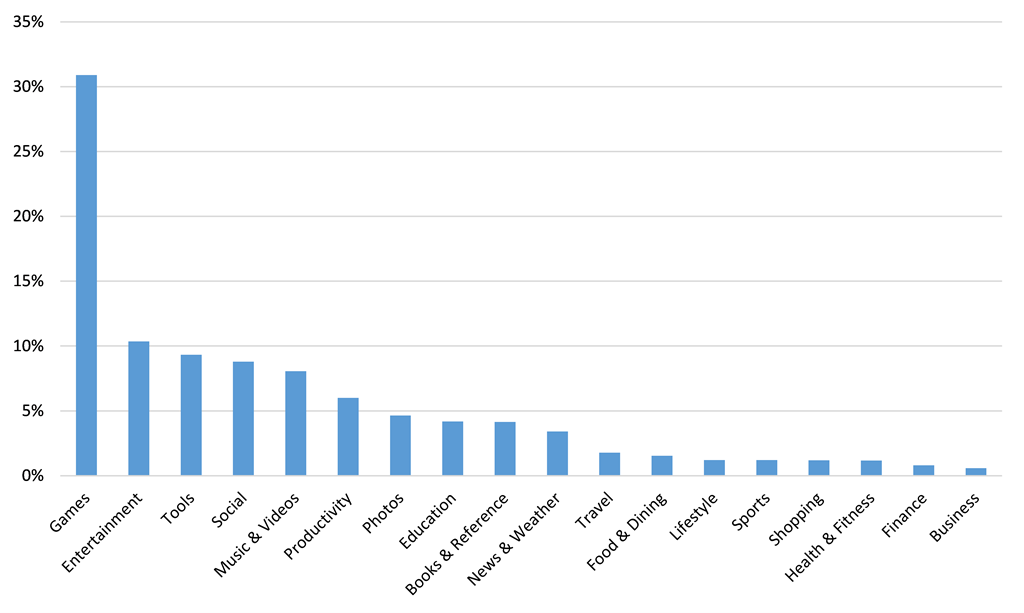
Downloads per category – Worldwide
Over the last three months, Games was the category with highest number of downloads, 3x higher than the next most popular category. This shows that many users are looking for, and finding, games in the Windows Store.
The next categories, Entertainment, Tools, Social, and Music are also very popular, showing a broad interest in these categories.
Categories with highest incremental download opportunity
In addition to understanding the categories with more app downloads, it helps to understand which category has the highest ratio of downloads per app. This is a function of total downloads vs. total available apps in that category.
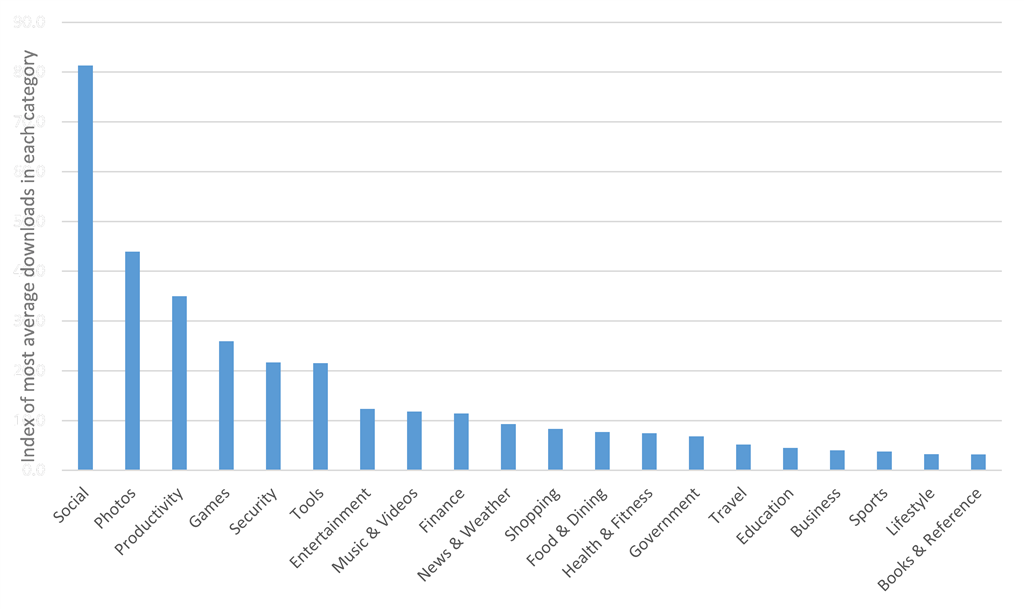
Average number of downloads per app, in each category – Worldwide
Social is the #1 category with most downloads per app, almost 2x more average downloads per app than the second category. Photos, Productivity and Games are the next categories with the highest opportunity. If your goal is reaching the maximum number of downloads possible, these categories present the highest potential for downloads.
As you compare the first and second graphs in this blog, you can see different trends and new potential opportunities. For example, the Games category has the highest number of downloads, but also has many more apps in the catalog so the competition is higher. As a result, there is a lower number of average downloads per app in Games than in Productivity or Photos.
For further analysis
We recommend you browse through the app catalog in the categories that you want to develop for, and analyze the top apps in each category to see what is making these apps successful. Learn from the leaders, select the category where you have the highest skill and most potential opportunity, and submit great apps.
This data can help inform your decisions for new apps or app updates. Please share your ideas on what additional data would be most helpful to help you build better Windows Store apps. We expect to share different analysis in the future, so your ideas will help us plan our next updates.
–Bernardo Zamora, Senior Business Manager, Windows Store and Windows Phone Store