

Microsoft Band: a closer look
Launched late last year, the Microsoft Band is designed to help you live healthier and be more productive. But how does it work? Let’s explore.
Simply looking at the exterior of the Microsoft Band doesn’t reveal its secrets. So let’s take a peek inside and pull out some of its best features.
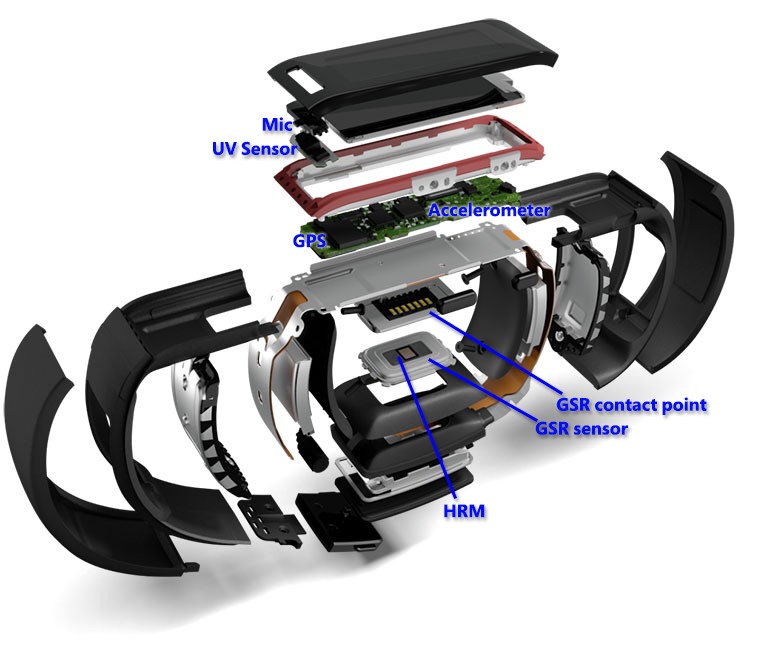
Optical Heart Rate Monitor
The Microsoft Band’s optical heart rate monitor can observe and report your current heart rate.
Besides simply recording your heart rate as you go about your day or even as you sleep, the fluctuations in your heart rate can help calculate the amount of calories you burn when you’re working out.
Microphone
If you’ve connected your Lumia 830 or any other Windows Phone smartphone running the 8.1 WP update to your Microsoft Band, you can use the built-in microphone to speak to Cortana, your personal digital assistant.
To activate Cortana, press and hold the action button on the side of the Microsoft Band.
https://www.youtube.com/watch?v=CEvjulEJH9w
UV sensor
Rather than wait for that stinging sensation to let you know you’ve spent too much time in the sun, the ultraviolet sensor on-board the Microsoft Band can give you a snapshot of the current UV levels.
High UV levels? Slap on more sunscreen, slip on a hat, or sneak back indoors for a while.
Tap the UV Tile to activate.
GPS
For location-based actions such as walking or running you may want to keep an exact log of where you’ve been.
When activated, the GPS collects info about the distance you travel and can be synced to your phone to show the route on a map within Microsoft Health app.
Use the Run Tile to start and stop GPS tracking.
Galvanic Skin Response (GSR) sensors
In order for the Microsoft Band to know if you’re wearing the device or not, it uses the GSR sensor–of which there are two.
The sensor itself is located near the optical heart rate monitor but needs the second contact point to complete the circuit–located near the charging port.
Accelerometer
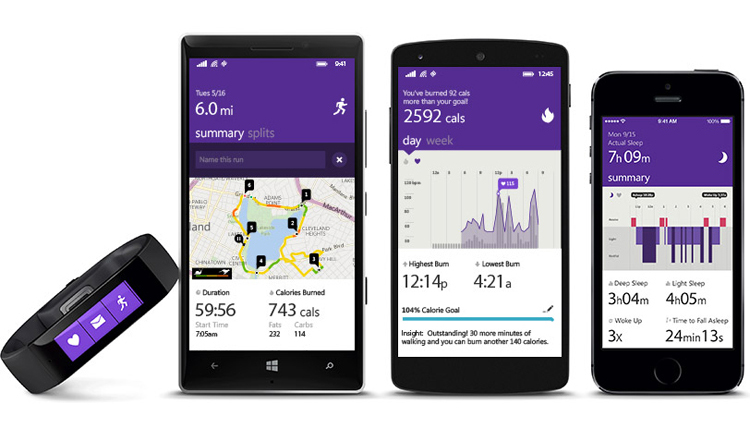
In order to track motion such as steps, the accelerometer is needed. Motion data, when combined with heart rate and your profile information, can help to estimate your calorie burn.
Ambient Light Sensor
The screen brightness on the Microsoft Band can be set according to your preference. However, you can have it automatically adjust as the light levels change around you, and for that you need the ambient light sensor.
Built and designed by Microsoft, the Microsoft Band works across various platforms, such as Windows Phone with the 8.1 update, iOS 7.1, 8 and Android 4.3-4.4 phones, via Bluetooth, and currently available in the U.S. for $199.99.
To make full use of all the features Microsoft Band has to offer, head over to the Windows Phone Store to download the Microsoft Health app.