

Edit Living Images with Lumia Creative Studio Beta
Lumia Creative Studio is packed with features that make it simple for you to edit your photos to perfection. Now, with the Beta release, you can edit even more.
Published with the Beta label, this version of Lumia Creative Studio (6.6.0.25) is for photographers who want to be first to get their hands on the updates and provide feedback to improve future editions.
Any photo you take can be tweaked in a number of ways with Lumia Creative Studio. They include:
- Color Pop: Remove one or more colors from the photo, resulting in a unique shot.
- Blur Background: This feature really focuses the eye onto a particular part of an image.
- Filters: Instantly change the look and mood of your photos by adding “Warm Copper,” “Vivid,” Retro Cool,” or many of the other one-tap filters.
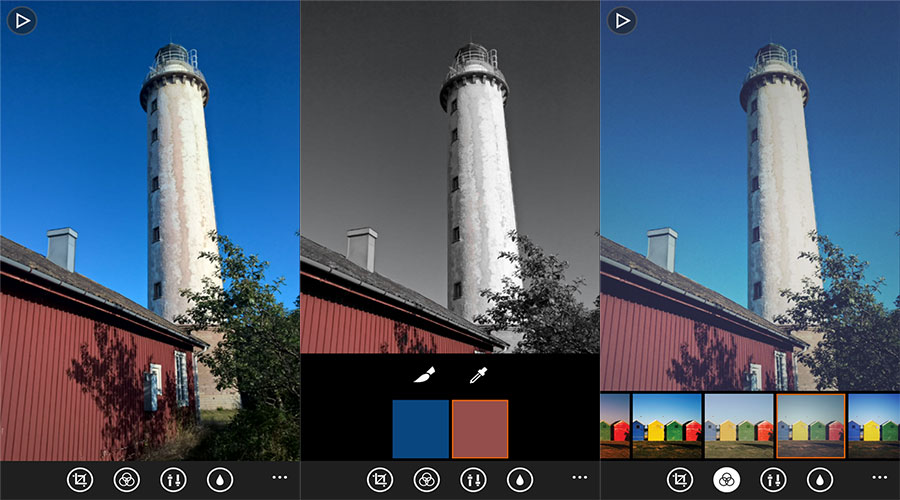
One new feature in this Beta version of the app is the ability to amend your Living Images captured with Lumia Camera. Living Images turns your static pictures into living memories so that when you flick through each of your photos, they come alive with additional motion.
As a Beta release, you may experience some bugs, all of which should be submitted to the feedback forum – it’s your duty as a Beta tester (and thank you for your help!).
Also note that the app is only available in the Windows Phone Store for Lumia owners running Windows Phone 8.1. If you’ve taken part in the Windows Insider program and are running Windows 10 Mobile tech preview on your phone you won’t be able to install the app at this time.
For more details on Lumia Creative Studio Beta, head over to the Microsoft Developer Blog. If you’ve downloaded and tried out this app, let us know what you think!