

As you have likely seen by now, Windows Phone 8.1 is full of many amazing new features, but perhaps one of the most visually striking is the new Start Background feature, which allows people to set their Start screen to have a background image displayed behind the tiles.
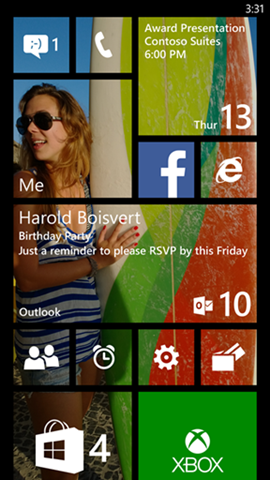
Figure 1Start Background in Windows Phone 8.1
There’s just one thing though… in order for users to see the image behind the tiles, the app’s tile needs to have a transparent background, so if yours doesn’t have this yet, here’s how to do it.
[Do note that if you used a transparent image asset for your tiles in Windows Phone 8.0, (which many did, since this is how you would have achieved a tile that respects the users’ accent color choice), then your tile will automatically support Start Background.]
1) Use a transparent .png for your tile
2) For those of you already targeting Windows Phone 8.1, update the ‘Background color’ setting in your package.appxmanifest file, (on the “Visual Assets” tab), to ‘transparent.’ There are, by the way, many different free image editors out there to assist you in this, my own personal favorite is Microsoft Expression Design).

Figure 2For WP 8.1 XAML Apps, set Background color to ‘transparent’
3) For a dynamically generated live tile, you’ll need to take an extra step: make certain that whatever mechanism you are using to generate your tile is building a transparent .png, (libraries like WriteableBitmapEx support this).
Start Background is one of the most popular new features of Windows Phone 8.1, and adding this capability can greatly improve your users’ experience. If you haven’t yet, we highly recommend that you take advantage of this feature today.