Skip to main content Skip to main content Windows Experience Devices Windows Developer Microsoft Edge Windows Insider Microsoft 365 Microsoft 365 Azure Copilot Windows Surface Xbox Deals Small Business Support Windows Apps Outlook OneDrive Microsoft Teams OneNote Microsoft Edge Moving from Skype to Teams Computers Shop Xbox Accessories VR & mixed reality Certified Refurbished Trade-in for cash Xbox Game Pass Ultimate PC Game Pass Xbox games PC games Microsoft AI Microsoft Security Dynamics 365 Microsoft 365 for business Microsoft Power Platform Windows 365 Small Business Digital Sovereignty Azure Microsoft Developer Microsoft Learn Support for AI marketplace apps Microsoft Tech Community Microsoft Marketplace Software companies Visual Studio Microsoft Rewards Free downloads & security Education Gift cards Licensing Unlocked stories View Sitemap
October 12, 2017
PC

Check out the new In-app ads dashboard in Windows Dev Center


We are happy to announce the new Monetize -> In-app ads section in Windows Dev Center. This is your one stop shop to create and manage the ad mediation settings of your UWP and Windows 8.x ad units.

You can find the In-app ads section under the Monetize section in the left navigation. On choosing this option, you can view your in-app ads dashboard that lists all your ad units, along with additional details such as application name, ad unit type, mediation settings, etc.
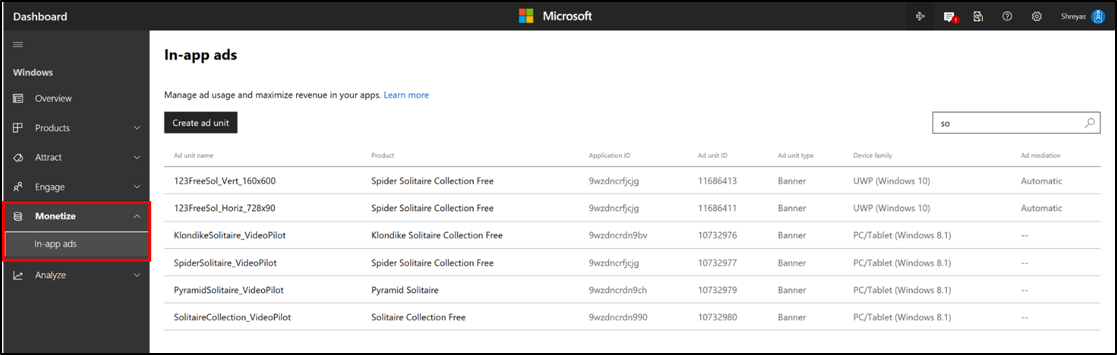
On clicking the ‘Create ad unit’ button, you will be taken to a new page where you can specify the ad unit details, configure the ad mediation settings for the ad unit and submit. The ad unit will then appear on your in-app ads dashboard.

Do note that you no longer need to start a submission to be able to create an ad unit – simply reserve your app name and you will be able to create an ad unit for it.
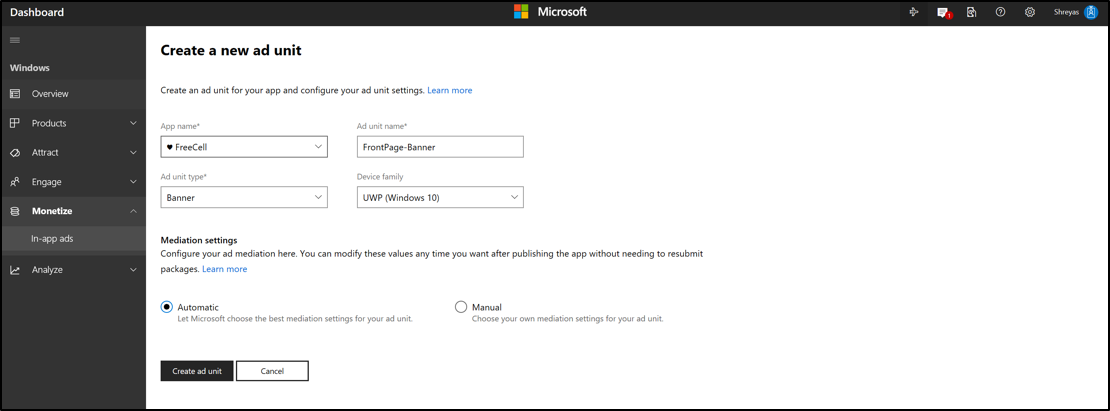
If you wish to change the mediation settings of an existing ad unit, simply click on the ad unit, change the settings and save.

For more information on these new experiences, please refer to this article.

We hope you enjoy the new experience! Please send your feedback to [email protected].

Your Privacy Choices Opt-Out Icon Your Privacy Choices
Consumer Health Privacy Sitemap Contact Microsoft Privacy Manage cookies Terms of use Trademarks Safety & eco Recycling About our ads