

Creating a subscription add-on
To enable the purchase of subscription add-ons in your app, your project must target Windows 10 Anniversary Edition (10.0; Build 14393) or a later release in Visual Studio (this corresponds to Windows 10, version 1607), and it must use the APIs in the Windows.Services.Store namespace to implement the in-app purchase experience instead of the Windows.ApplicationModel.Store namespace. For more information about the differences between these namespaces, see In-app purchases and trials.
1) Create an add-on submission for your subscription in the Dev Center dashboard and publish the submission.
- For Product type, ensure that you select Subscription.
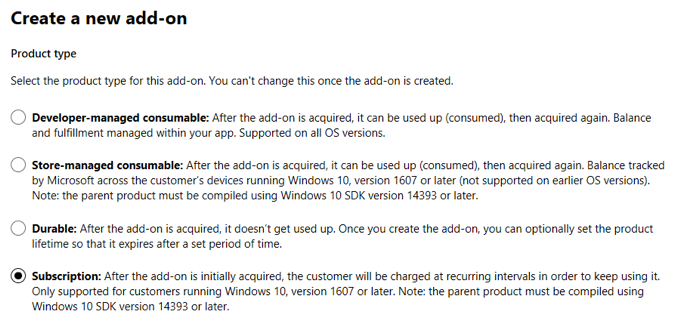
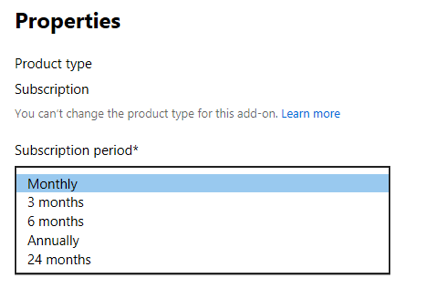
- When offering subscription add-ons to your customers, you can choose to offer a subscription period of 1 month, 3 months, 6 months, 1 year or 2 years. You can also add a free trial period of 1 week or 1 month so your customers can try out the add-on before they commit to purchasing.
2) In your app, use APIs in the Services.Store namespace to determine whether the current user has already acquired your subscription add-on and then offer it for sale as an in-app purchase.
3) Test the in-app purchase implementation of your subscription in your app. You’ll need to download your app once from the Store to your development device to use its license for testing.
4) Create and publish an app submission that includes your updated app package, including your tested code.
For a complete overview of add-on subscriptions and how to implement them into your UWP app, please visit our documentation.
Customer management
Customers can manage their purchased subscriptions from the services & subscriptions page for their Microsoft account. Here they’ll find all the subscriptions they have acquired, with options to cancel a subscription or change the form of payment associated with a subscription.
Offering add-on subscriptions can be a great monetization strategy for your apps and games. As you go through the implementation process, please provide us with any feedback via the Feedback link in the upper right corner of the Dev Center dashboard.