Skip to main content Skip to main content Windows Experience Devices Windows Developer Microsoft Edge Windows Insider Microsoft 365 Microsoft 365 Azure Copilot Windows Surface Xbox Deals Small Business Support Windows Apps Outlook OneDrive Microsoft Teams OneNote Microsoft Edge Moving from Skype to Teams Computers Shop Xbox Accessories VR & mixed reality Certified Refurbished Trade-in for cash Xbox Game Pass Ultimate PC Game Pass Xbox games PC games Microsoft AI Microsoft Security Dynamics 365 Microsoft 365 for business Microsoft Power Platform Windows 365 Small Business Digital Sovereignty Azure Microsoft Developer Microsoft Learn Support for AI marketplace apps Microsoft Tech Community Microsoft Marketplace Marketplace Rewards Visual Studio Microsoft Rewards Free downloads & security Education Gift cards Licensing Unlocked stories View Sitemap
September 17, 2018
PC

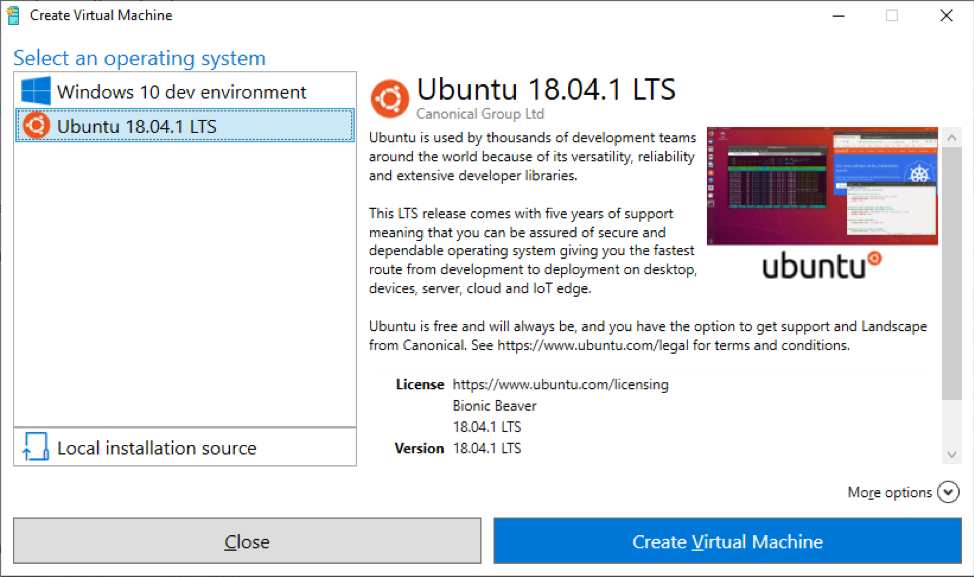
Run Ubuntu virtual machines made even easier with Hyper-V Quick Create


Today, we’ve made running Linux even easier on Windows 10. With the Hyper-V Quick Create feature added in the Windows 10 Fall Creators Update, we have partnered with Ubuntu and added a virtual machine image so in a few quick minutes, you’ll be up and developing. This is available now – just type “Hyper-V Quick Create” in your start menu!

The Hyper-V Quick Create in your start menu.

Please note, this feature does require Hyper-V. Please head over to the docs to learn more about Hyper-V and enabling it.

On top of running Ubuntu in a virtual machine, you can use Windows Subsystem for Linux. WSL is a Windows 10 feature that enables you to run native Linux command-line tools directly on Windows. WSL is an extremely easy to install feature on Windows 10, and you can run Ubuntu, Suse, Debian and other distros as well. And if you want to build your own distro and use that, you can too!

Your Privacy Choices Opt-Out Icon Your Privacy Choices
Consumer Health Privacy Sitemap Contact Microsoft Privacy Manage cookies Terms of use Trademarks Safety & eco Recycling About our ads