Skip to main content Skip to main content Windows Experience Devices Windows Developer Microsoft Edge Windows Insider Microsoft 365 Microsoft 365 Azure Copilot Windows Surface Xbox Deals Small Business Support Windows Apps Outlook OneDrive Microsoft Teams OneNote Microsoft Edge Moving from Skype to Teams Computers Shop Xbox Accessories VR & mixed reality Certified Refurbished Trade-in for cash Xbox Game Pass Ultimate PC Game Pass Xbox games PC games Microsoft AI Microsoft Security Dynamics 365 Microsoft 365 for business Microsoft Power Platform Windows 365 Small Business Digital Sovereignty Azure Microsoft Developer Microsoft Learn Support for AI marketplace apps Microsoft Tech Community Microsoft Marketplace Marketplace Rewards Visual Studio Microsoft Rewards Free downloads & security Education Gift cards Licensing Unlocked stories View Sitemap
May 23, 2016
Mobile

Publishing hidden apps (Dev Center Tip #5)


Sometimes you need to publish apps to a limited audience. To do so, you should select the option to hide your app when you distribute it. Hidden apps will not show up in store searches and cannot be browsed. If tight control over who can download the app isn’t vital, you should share a deep link to your app. This is the most flexible option and allows others to resend the link. If limiting who has access to your app is important, you should choose the hide and prevent acquisition option instead. By choosing to prevent acquisition, you ensure that any promo codes you give out are the sole way to access your app. (Be sure to consult the flowchart in the first post of this series for an overview of why hidden apps may be a more suitable choice than package flighting for you.)

Publish app as hidden and share the deep link

If you want a simple way to make your app available to some users, but don’t need to strictly limit it only to those users, publish the app as hidden, and then share the link with people. Anyone who has the link will be able to acquire the app, and this works for customers on Windows Phone 8.x, and Windows 10.

This option is selected by choosing Hide this app in the Store in the Distribution and visibility section of the submission process.

1_devcentertip5

Publish app as hidden and prevent acquisition – use promo codes to grant access

If you need to limit access to the app, publish the app so it cannot be acquired by any user, even with a direct link, and distribute promotional codes to specific users. Note that once a customer uses a promo code, they will always have access to that app in the future; you cannot remove access to the app.

This is one of the most effective options to manage a closed beta and works for customers running all supported OSs (Windows 8.x, Windows 10).

To use this option, select Hide this app and prevent acquisition in the “Distribution and visibility” section of the submission process.

2_devcentertip5

Then, generate promo codes for the app and distribute them to the individuals that you want to grant access to.
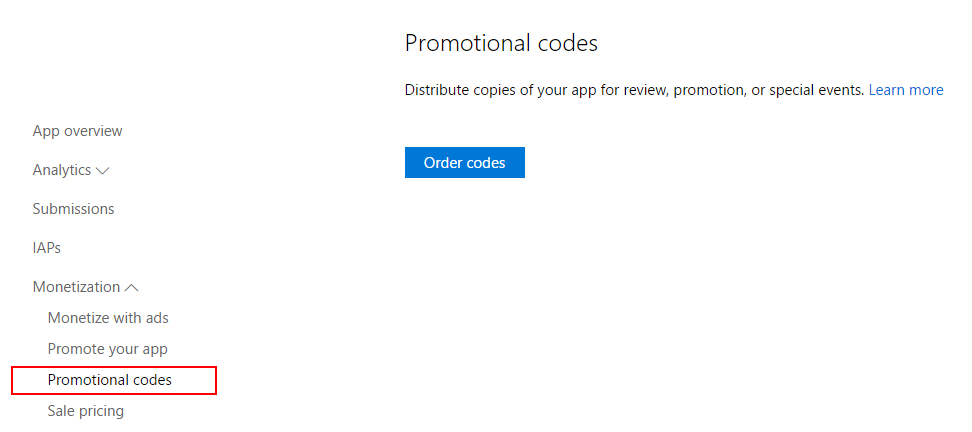
3_devcentertip5

Note: Promo codes will work after the first app submission is live, so it’s recommended that you not distribute the promo codes until the app displays ‘In the Store’ as the publishing status.

Other posts in the Dev Center Tips series:

Your Privacy Choices Opt-Out Icon Your Privacy Choices
Consumer Health Privacy Sitemap Contact Microsoft Privacy Manage cookies Terms of use Trademarks Safety & eco Recycling About our ads