Skip to main content Skip to main content Windows Experience Devices Windows Developer Microsoft Edge Windows Insider Microsoft 365 Microsoft 365 Azure Copilot Windows Surface Xbox Deals Small Business Support Windows Apps Outlook OneDrive Microsoft Teams OneNote Microsoft Edge Moving from Skype to Teams Computers Shop Xbox Accessories VR & mixed reality Certified Refurbished Trade-in for cash Xbox Game Pass Ultimate PC Game Pass Xbox games PC games Microsoft AI Microsoft Security Dynamics 365 Microsoft 365 for business Microsoft Power Platform Windows 365 Small Business Digital Sovereignty Azure Microsoft Developer Microsoft Learn Support for AI marketplace apps Microsoft Tech Community Microsoft Marketplace Software companies Visual Studio Microsoft Rewards Free downloads & security Education Gift cards Licensing Unlocked stories View Sitemap
January 17, 2019
Uncategorized

Choose your own layout with updated Microsoft News app


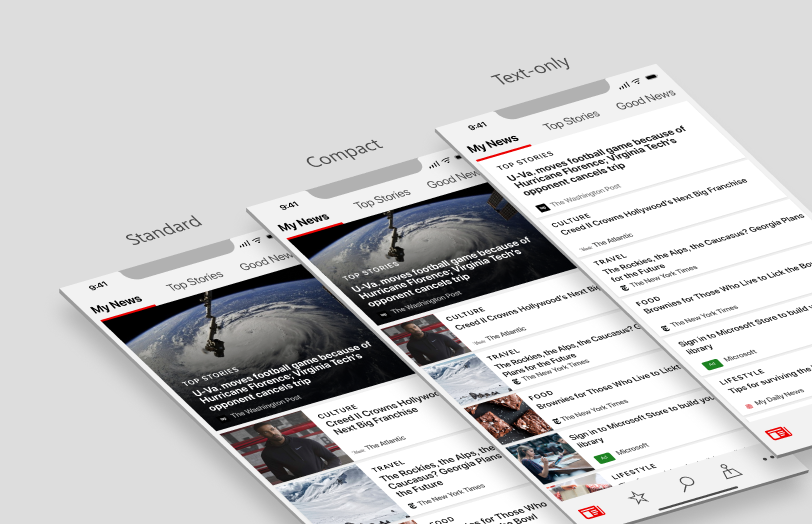
Layout choices for your news feed: standard, compact or text-only

Users of the newly redesigned Microsoft News app for iOS and Android have given the release high marks in their feedback, plus some interesting feature suggestions. One of the top requests has been for the ability to choose a more compact layout of the news feed.

In response, the Microsoft News team announced Thursday the new Layout Choices feature for your news feed on your phone.

“This feature puts you in control of the layout for your news feed: standard, compact or text-only,” Senior Program Manager Lance Lee said in a blog post. “While the standard layout provides a modern and beautiful experience, you can choose to see more news stories at a glance in the compact or text-only views.”

Check out the blog post for additional images, info and more. Don’t have the Microsoft News app yet? Get it now for your iOS or Android device.

Your Privacy Choices Opt-Out Icon Your Privacy Choices
Consumer Health Privacy Sitemap Contact Microsoft Privacy Manage cookies Terms of use Trademarks Safety & eco Recycling About our ads