

Focusing on design: Nokia Camera
Nokia Camera is different from other smartphone cameras on the market. It opens up a new world of creativity.
“With Nokia Camera, we’ve created the perfect balance of features and simplicity” says Janne Kaasalainen from Nokia Design.
It does this by giving you the ability to control the shutter speed, ISO levels, and the focus and much more besides. But not only that, it does it without being confusing, thanks to the cleverly designed – and award winning – user interface (UI).
“When you take a photo, you want as little on screen as possible. When you’re fine-tuning the controls however, you want to see these clearly while also having visibility on the world through your viewfinder. As you change some of the picture controls, you can directly see how that will effect your photo.”
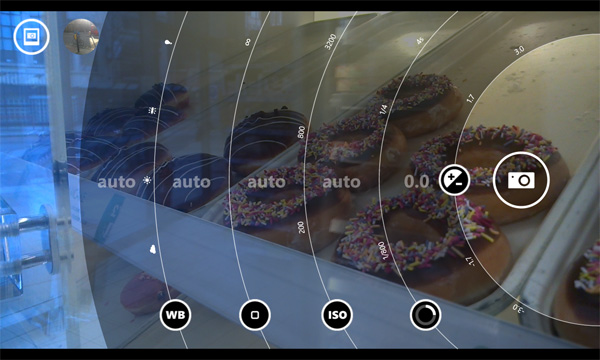
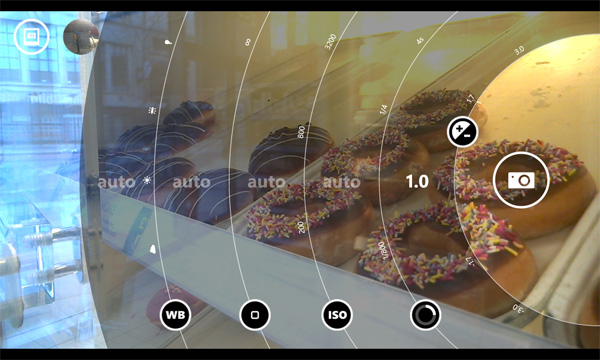
The solution was to design a transparent UI that could be swept away easily, at a moment’s notice, and that’s precisely how it works on Nokia Camera.
For the most part, the controls are hidden from view. It’s not until you explore the mini control bar at the top of the viewfinder, or slide the camera icon to the middle of the screen, that you discover all the controls.
The transparent controls allow you to see the picture you are going to take while you make adjustments. However, it’s not just the presentation of the controls that’s impressive, it’s the way you interact with them.
“We’ve really thought about how people use and hold their camera phones when taking photos. It’s natural to use your thumb for interacting with the screen when your fingers are holding the rest of the phone.” explains Jung-Chen Hung, who worked on the visual and motion design of the Nokia Camera.
“In that position, your thumb moves in a circular motion and we designed the dials to reflect that movement.”
The rounded, circular design of the control dials allows for much more freedom and fluidity, leaving you to concentrate on what matters most – taking the shot.
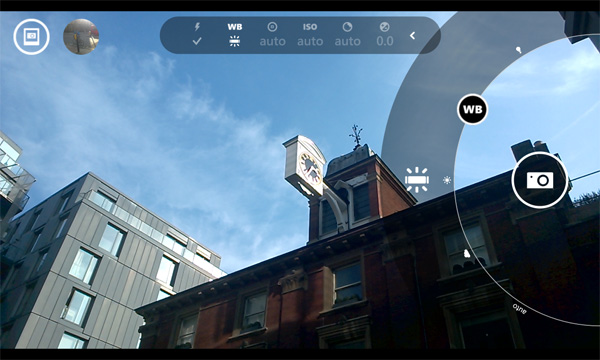
In addition, the moment you touch a dial it detaches itself from the rest of the UI, allowing it to be moved across the screen and out of the way of your photo subject.
Nokia Camera is a Nokia Lumia exclusive and can be downloaded from Windows Phone store. Make sure you have the latest Lumia software update, Nokia Lumia Black, installed first.
Don’t forget to rate and review Nokia Camera as Janne tells us they regularly use this feedback when it comes to future updates.
Additionally, the Nokia Camera team monitor Nokia Camera Beta users to help create the best possible experience for everyone.
Are you using Nokia Camera? What do you love about it? Tell us in the comments.